Search no longer rewards keywords alone — it rewards clarity. Large language models now read, reason, and restate information, deciding which brands to quote when they answer. An AI search strategy adapts content for that shift, focusing on being understood and cited, not just ranked and clicked.

Structured data defines entities and relationships; concise statements make them extractable; CRM connections turn unseen visibility into measurable influence. Clicks may decline, but authority doesn’t. In AI search, every sentence becomes a new point of discovery.
This article explores what an AI search strategy is and how content marketers and SEOs can implement an effective one. Readers will also learn how to measure success and the tools that can help. Check your AI visibility with HubSpot’s AEO Grader to see how AI systems currently represent your brand.
Table of Contents
- What is an AI search strategy?
- Where Inbound Marketing Fits
- AI Search Strategy for Content Marketers and SEOs
- How Loop Marketing Integrates With Your AI Search Strategy
- How to Measure AI Search Strategy Success
- How HubSpot’s AEO Grader Can Help
- Frequently Asked Questions About AI Search Strategy
What is an AI search strategy?
An AI search strategy is a plan to optimize content for AI-powered search engines and answer engines. An AI search strategy aligns content with how large language models (LLMs) and answer engines interpret, summarize, and attribute information.
Traditional SEO optimizes for rankings and clicks; AI search optimization focuses on eligibility and accuracy so that when AI systems generate an answer, they can recognize, quote, and correctly attribute a brand. This kind of AI search optimization ensures machine learning systems can interpret your brand’s authority and present it accurately across AI Overviews, chat results, and voice queries.
In practice, that means structuring content so every paragraph can stand alone as a verifiable excerpt. Sentences should use clear subjects, defined relationships, and unambiguous outcomes. Schema markup confirms what each page represents — its entities, context, and authorship — while consistent naming helps AI systems map those entities across the web.
This approach reframes SEO fundamentals for the LLM era. Topics, intent, and authority remain essential, but the unit of optimization shifts from the page and its keywords to the paragraph and its relationships.
The Building Blocks of AI Search
Large language models interpret not just words, but the relationships between concepts — what something is, how it connects, and who it comes from. Three foundational elements make that possible: entities, schema, and structured data. Together, these determine whether AI systems can recognize, understand, and cite a brand’s expertise.
Entities: How AI Defines “Things”
An entity is a clearly identifiable thing — a person, company, product, or idea. If keywords help humans find information, entities help machines understand it.
Example:
- Entity: HubSpot (Organization)
- Related entities: Marketing Hub (Product), AEO Grader (Tool), Marketing Against the Grain (Creative Work)
When entity names appear consistently across content and structured data, AI systems can unify them into a single node in their knowledge graphs so that a brand is interpreted as one coherent source.
Schema: How AI Reads the Context
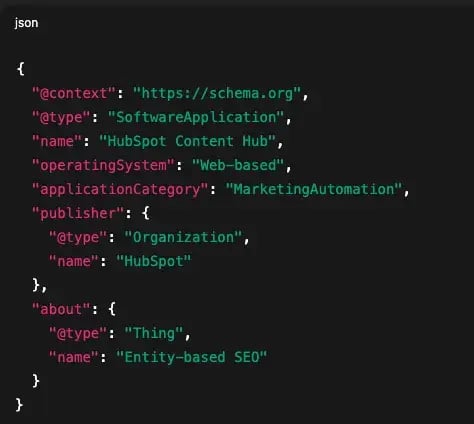
Schema is a type of structured data that uses a shared vocabulary (like Schema.org) to label what’s on a page. It tells search engines and AI models exactly what kind of content they’re seeing — an article, a product, an FAQ, an author, and more.
Examples:
- Adding FAQPage schema clarifies that the section answers specific questions.
- Adding Organization schema connects your brand to official profiles and logos.
Without schema, AI must infer meaning; with it, the developers state meaning explicitly.
Structured Data: How AI Connects the Dots
Structured data refers to any information arranged for machine readability. That includes JSON-LD schema markup and visible structures like tables, bulleted lists, and concise TL;DR summaries. These formats help models extract and relate ideas efficiently.
Structured data improves content eligibility and interpretability for AI search engines. For marketers, structured data forms the technical foundation of Answer Engine Optimization (AEO), making content more eligible for AI Overviews, knowledge panels, and chat citations.
How AI Changes Discovery
Search used to work like a race: crawl, index, rank. Now, it works more like a conversation. LLMs read, extract, and restate what they understand to be true. Visibility still matters, but the rules have changed.
Clarity is now the new authority signal. AI systems surface statements they can quote confidently — sentences that express a clear subject, predicate, and object. The most citable content isn’t the longest but the clearest.
Eligibility now comes before position. Before a model can recommend a brand, it must recognize it. That recognition depends on consistent entities, clean schema, and structured formats such as FAQs, tables, and summaries.
The goal has shifted from outranking competitors to earning inclusion in the model’s reasoning — writing statements precise enough that AI can reliably reference and attribute them.
|
Dimension |
Old SEO (pre-AI) |
AI Search (LLM era) |
|
Primary goal |
Rankings, CTR |
Citations, mentions, eligibility in AI Overviews |
|
Optimization unit |
Keyword → Page |
Entity / Relationship → Paragraph |
|
Formatting cues |
Long sections, link architecture |
Summaries, tables, FAQs, short standalone chunks |
|
Authority signals |
Backlinks, topical breadth, EEAT |
Factual precision, schema, entity consistency, EEAT |
|
Measurement |
Sessions, positions, CTR |
AI impressions, brand mentions, assisted conversions |
|
Iteration loop |
Publish → Rank → Click |
Structure → Extract → Attribute → Refine |
What “Zero-Click” Really Means
AI search strategy prioritizes earning citations from large language models and optimizing for zero-click results. But zero-click doesn’t mean zero value. It means the first moment of influence happens before anyone visits your site. When AI systems quote your definition or summarize your advice, your brand still earns awareness — it just happens off-site.
In this model, trust builds through representation, not traffic. The goal is to connect the invisible touchpoints to real outcomes.
- AI impressions show how often your ideas appear in AI results.
- Entity mentions confirm how accurately the models recognize your brand.
- Assisted conversions reveal when that early visibility leads to engagement or revenue.
When these signals feed into a CRM, visibility becomes measurable. Recognition — not just clicks — becomes the proof of value.
Where Inbound Marketing Fits
Inbound marketing still anchors the strategy, but the first moment of connection moves upstream. A table, a TL;DR, or a one-sentence definition can now introduce a brand within an AI experience. From there, the familiar lifecycle continues: capture interest, deliver value, nurture, convert, and retain.
The shift is in how teams connect those off-site impressions to real results. That connection depends on visibility data, structured content, and CRM attribution working together. HubSpot’s ecosystem supports that stitching in practical ways:
- AEO Grader reveals how brands appear across AI systems and highlights visibility and sentiment gaps.
- Content Hub ensures templates, content briefs, and modules support consistent structured data and defined entities.
- Marketing Hub enables multi-channel tracking and allows experiments with new entry and conversion paths.
- Smart CRM captures contacts influenced by content, tracks assisted conversions, and links those signals to stage and revenue outcomes.
The fundamentals haven’t changed: Be useful, be clear, be consistent. The difference is that the first win now happens in a sentence, not a search ranking.
AI Search Strategy for Content Marketers and SEOs
An AI search strategy for content marketers and SEOs focuses on clarity, structure, and measurable visibility. The process unfolds in five practical stages:
- Audit current AI visibility.
- Structure content for answer engines.
- Optimize for citations over clicks.
- Operationalize and automate.
- Attribute and iterate.
Each stage builds on the last, creating a repeatable system that turns structured clarity into discoverability — and discoverability into influence measurable within a CRM.
Step 1: Audit current AI visibility.
Every AI search strategy starts with understanding how the brand appears across AI environments. HubSpot’s AEO Grader establishes that visibility baseline by querying leading AI engines (GPT-4o, Perplexity, Gemini) to analyze how they describe, position, and cite a brand in synthesized answers.
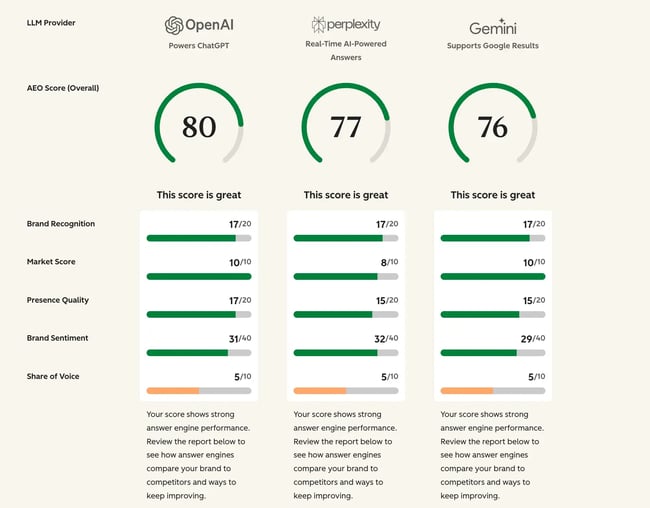
The report focuses on five measurable areas:
- AI Visibility Score. Frequency and prominence of a brand’s inclusion in AI-generated results.
- Contextual Relevance. How accurately AI engines associate the brand with key topics and use cases.
- Competitive Positioning. How the brand appears relative to peers (Leader, Challenger, or Niche Player).
- Sentiment Analysis. Tone and credibility of AI references to the brand across contexts.
- Source Quality. Credibility of the external sources AI systems rely on when representing the business.
Together, these indicators provide a top-level view of brand representation in AI search. AI Search Grader diagnoses AI search visibility and optimization gaps. Marketing teams receive a snapshot of how clearly AI understands and communicates their identity.
Step 2: Structure content for answer engines.
In this new format, the content’s structure becomes the primary delivery vehicle for ideas and positioning. Think of each heading as a micro-search intent. Beneath it, the first 2–3 sentences should provide a direct answer that can stand alone in AI summaries. This pattern mirrors how LLMs read pages: segment by segment, not end to end.
Practical structure principles to incorporate in the strategy include:
- Lead with clarity. Open with a plain-language answer before adding background or nuance.
- Use TL;DR or summary blocks. Brief recaps under each H2 make information easier to extract for answer engines.
- Keep paragraphs compact. Short sections (roughly 50–100 words) maintain readability for both humans and models.
- Show relationships visually. Tables, numbered lists, and bullet points help AI systems map entities and connections.
- Add schema at the template level. Apply Article, FAQ, or other structured data to the full page so that intent and entities are clear to crawlers and AI systems alike.
HubSpot’s Content Hub enables this structure through AI-assisted content briefs, reusable templates, and module-based schema fields. Together, structure and schema make information easier to interpret, cite, and reuse across AI-driven discovery.
Step 3: Optimize for citations, not clicks.
Traditional SEO optimized content for rankings. AI search optimizes for credibility, meaning your paragraph earns the right to appear in the model’s reasoning chain. That credibility depends on your language’s consistency and verifiability.
LLM citations happen when:
- Entities are clearly named.
- Facts are precise and locatable.
- Relationships are clarified.
- Paragraphs are self-contained.
Use these patterns within paragraphs to write toward a citation:
- [Tool] helps [audience] [achieve goal] through [method].
- [Process] improves [metric] when [condition].
- [Feature] reduces [pain point] for [persona].
A model can extract this information and attach attribution reliably. That’s what moves a line of text from “invisible background noise” to “cited authority.”
Step 4: Operationalize and automate.
An AI search strategy becomes sustainable when automation and consistency support it. Within HubSpot’s connected ecosystem, each tool reinforces the broader AI search optimization process:
- Content Hub – Centralizes briefs, templates, and schema fields to keep structure and metadata consistent.
- Marketing Hub – Runs campaign tests and optimizes CTAs and formats for low-click environments.
- Smart CRM – Unifies marketing and sales data so attribution connects structured content to lifecycle progress.
- Breeze Assistant – Accelerates ideation and content outlining for conversational format.
Together, these tools turn AEO from a one-time project into a repeatable system: structure, publish, measure, refine.
Start this process with HubSpot’s Content Hub and Marketing Hub for free.
Step 5: Attribute and iterate.
An AI search strategy works best as a continual system. The goal is to connect what your content earns in AI environments to what it drives in your CRM. Marketing teams then repeat that process with each update. Over time, this loop turns structured visibility into measurable growth — the practical outcome of a scalable AI SEO strategy.
Start by running the AEO Grader on core pages monthly. Use those results to identify where AI search results improved (and where they didn’t). Refine what works, adjust what doesn’t, and measure again. Over time, this rhythm turns AI visibility into a continuous cycle of structure, validation, and growth.

How Loop Marketing Integrates With Your AI Search Strategy
Loop Marketing is HubSpot’s four-stage operating framework for growth in the AI era. It operationalizes AI search optimization by combining brand clarity, data precision, and continuous iteration within HubSpot’s AI ecosystem.
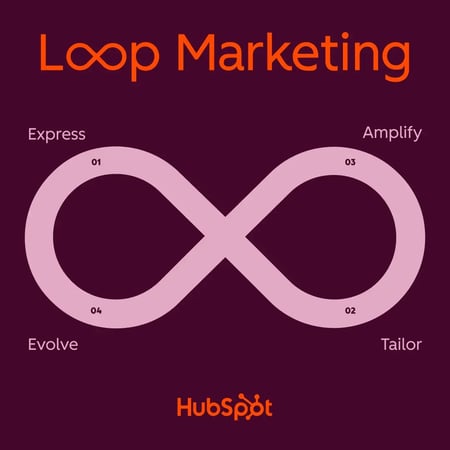
Stage 1: Express — Define your brand identity.
The Express stage builds clarity. AI tools can generate content, but they can’t replicate perspective or tone. Consistent naming, style, and messaging strengthen entity accuracy so models recognize and attribute a brand correctly across summaries and search results.
Stage 2: Tailor — Personalize your approach.
The Tailor stage aligns content with audience intent. Unified CRM data reveals patterns that inform relevance and timing. Personalization ensures that when AI systems surface content, it resonates with context and feels built for each reader.
Stage 3: Amplify — Extend your reach.
The Amplify stage broadens discoverability across channels. Structured content, distributed through multiple formats, reinforces authority signals that help AI systems and human audiences encounter a brand consistently. Cross-channel repetition turns structure into recognition.
Stage 4: Evolve — Improve through feedback.
The Evolve stage transforms performance data into iteration. Visibility insights and assisted conversions inform what to update and where to focus. Each cycle sharpens accuracy and efficiency, creating a self-learning system that compounds.
|
Loop Stage |
Purpose |
Connection to AI Search |
|
Express |
Define a brand identity |
Strengthens entity accuracy for AI citation |
|
Tailor |
Personalize by data |
Aligns content to user intent and context |
|
Amplify |
Distribute widely |
Expands authority signals across channels |
|
Evolve |
Analyze and optimize |
Feeds insights back into structured updates |
How to Measure AI Search Strategy Success
Measuring AI search strategy performance requires blending traditional SEO metrics with new signals from AI visibility and CRM attribution. Measurement goes beyond traffic and into how machine learning SEO systems interpret, quote, and credit expertise.
AI search performance is measured by AI impressions, assisted conversions, and engagement depth. When teams link visibility, structure, and CRM attribution, they can see how AI exposure yields measurable results. HubSpot’s 2025 AI Trends for Marketers report found that 75% of marketers report measurable ROI from AI initiatives, primarily through improved efficiency and insight.
Core Metrics for AI Search Performance
|
Metric |
What it measures |
Why it matters |
|
Assisted Conversions |
Deals or contacts influenced by a content asset, even without a direct click |
Shows how early-stage content contributes to revenue |
|
Schema Coverage |
Share of key pages with valid Article, FAQ, or Organization markup |
Improves eligibility for AI and answer-engine visibility |
|
Entity Consistency |
Uniform naming for brand, product, and author entities |
Ensures correct recognition and citation in AI summaries |
|
AI Visibility |
How often a brand appears in AI-generated results (AEO Grader, Gemini, Perplexity) |
Expands reporting beyond clicks to include AI exposure |
|
Engagement Depth |
Time on page, scroll rate, and repeat sessions from structured content |
Indicates quality of engagement after AI discovery |
Emerging or Stretch Metrics
These indicators point toward where attribution is heading, not where it is today. AI visibility data doesn’t directly integrate into CRM or analytics platforms (yet), so these signals work best as experimental metrics that provide directional insight.
- AI Share of Voice – Frequency of brand mentions versus competitors in AI results.
- AI-Informed Pipeline – Revenue influenced by AI-discovered contacts.
- Brand Recall via Entity Health – Consistency of brand phrasing in AI outputs.
- Lifecycle Velocity – Speed of movement through CRM stages after AI exposure.
Making AI Visibility Measurable
An AI search strategy becomes measurable by relying on the systems that already prove marketing performance. Today, HubSpot supports practical measurement through assisted conversions, engagement depth, and structured-data visibility — all available inside Smart CRM and Marketing Hub. AEO Grader adds narrative and competitive context, showing how AI systems describe the brand. Together, these signals create a repeatable framework for improvement, while newer AI-specific metrics continue to evolve.
How HubSpot’s AEO Grader Can Help
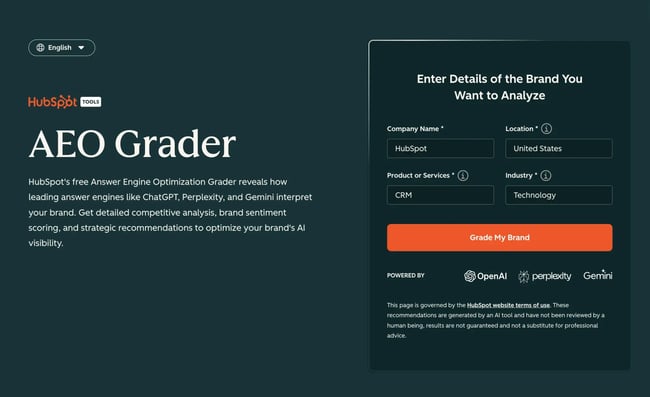
HubSpot’s AEO Grader analyzes how leading AI engines describe a brand when answering real user queries. Instead of measuring clicks or rankings, the Grader evaluates brand visibility, narrative themes, sentiment, and competitive standing inside AI-generated responses. It reveals how AI systems characterize a company in synthesized answers and whether that representation aligns with the brand’s goals.
AEO visibility depends on how consistently and accurately AI engines summarize your brand. The Grader turns those qualitative signals into structured indicators that highlight strengths, gaps, and opportunities to improve AI-era discoverability.
What the AEO Grader Evaluates
The AEO Grader report includes three primary dimensions related to a brand’s AI search visibility.
|
Metric |
What it checks |
Why it matters |
|
AI Visibility / Share of Voice |
How often a brand appears in AI-generated answers across GPT-4o, Gemini, and Perplexity |
Shows relative brand presence in synthesized AI results and category conversations |
|
Brand Narrative & Sentiment |
The tone, themes, and language AI engines use when describing the brand |
Highlights which storylines shape perception and how credibility or expertise is framed |
|
Source Credibility & Data Richness |
The authority and completeness of external sources AI engines reference |
Reveals whether models rely on strong, reliable information or weak/noisy sources |
Run this audit consistently (quarterly or monthly) to get a clear timeline of how AI systems shift their descriptions, introduce new competitors, or adjust sentiment. Tracking these changes over time shows whether your brand is gaining clarity and relevance or losing ground in AI-generated narratives.
Frequently Asked Questions About AI Search Strategy
How long does it take to see results from an AI search strategy?
Most teams start seeing movement within a few weeks of implementing structural updates, like adding schema or tightening TL;DR sections. But sustainable visibility usually takes three to six months.
AI systems surface new content quickly, but actual results depend on model refresh cycles and the consistency of your updates. HubSpot’s 2025 AI Trends for Marketers Report shows that AI adoption speeds up content production and experimentation, giving teams more frequent opportunities to refine and update structured content — a key factor in improving AI visibility.
Do I need to rebuild my entire content library for AI search?
No, you can evolve what you already have. Start by modernizing your highest-performing pages — the 20% that drives most of your organic or assisted conversions.
Add Article and FAQ schema (using built-in blog templates or custom modules), clarify entities (brand, author, product), and insert concise TL;DRs under each major heading. Then, move outward through supporting pages. This incremental approach builds visibility faster and avoids overwhelming your team.
Which structured data should I implement first?
Start with structured data that helps AI systems interpret both content and context. At the content layer, use visible structure: tables, bulleted lists, and short Q&A sections under each heading. At the metadata layer, apply Schema.org markup, starting with Article, FAQPage, and Organization. These schema types clarify what the page covers and whom it represents.
How do I prove value to leadership when clicks are declining?
Zero-click environments require conversion paths that do not rely on traditional clicks. They show influence, not traffic. Traditional analytics miss the visibility your brand gains when AI systems cite or summarize your content.
Connect visibility to revenue with the following tools:
- AEO Grader, which shows brand presence and sentiment in AI results.
- HubSpot Smart CRM, which shows contact and deal movement influenced by AI-discovered content.
- Marketing Hub, which showcases conversions and engagement depth.
What’s the best way to keep AI search work sustainable?
AI search optimization stays sustainable when it’s folded into your normal reporting cycle.
- Run AEO Grader audits on a consistent cadence (monthly or quarterly) to track how AI systems describe your brand and competitors.
- Use Content Hub templates and custom modules to keep structured data and schema fields current.
- In Smart CRM, log or import the insights from each audit so engagement and lifecycle metrics can be reviewed alongside AI visibility trends.
Does Loop Marketing replace inbound marketing?
Inbound marketing still forms the foundation. Loop Marketing builds on it to meet the realities of AI-era discovery. Where inbound organizes around a linear funnel, Loop Marketing creates a four-stage cycle — Express, Tailor, Amplify, Evolve — that keeps your brand message adaptive across channels and AI systems.
Do I have to use HubSpot products to implement an AI search strategy?
No, but HubSpot’s connected tools make implementation easier. You can apply AEO principles manually, but HubSpot’s ecosystem streamlines the process:
- AEO Grader surfaces brand visibility, narrative, sentiment, and competitive gaps across AI systems.
- Content Hub centralizes creation, supports schema-ready templates, and includes AI-assisted content features.
- Marketing Hub and Smart CRM track engagement and convert signals into revenue outcomes. You can also import or tag AI visibility data manually for full-funnel attribution.
According to HubSpot’s 2025 AI Trends for Marketers Report, 98% of organizations plan to maintain or increase AI investment this year. Connected tools simply speed up progress.
How will I know if AI systems recognize my brand?
Use AEO Grader to see how AI systems describe your brand and where you appear in category-level answers. Then, test key topics directly in assistants like Gemini, ChatGPT, and Perplexity to see how individual pages are referenced.
Make AI search strategy a system, not a sprint.
AI search has reshaped how visibility works, but the fundamentals still apply: Clarity earns trust, and structure earns reach. Winning marketers will build systems that connect visibility to measurable outcomes.
HubSpot’s AEO Grader makes AI visibility tangible. It reveals how generative search systems describe a brand — what they highlight, how often it appears, and how the story compares to competitors. These insights help marketing teams see where their message lands inside AI-driven discovery and where clarity or coverage needs work.
AI search has become measurable not by clicks, but by presence and perception. The smartest way to improve both is by understanding how AI already represents your brand.
Get a free demo of HubSpot’s Breeze AI Suite and Smart CRM and see how HubSpot connects AI visibility, structure, and attribution.

from Marketing https://blog.hubspot.com/marketing/ai-search-strategy
Search no longer rewards keywords alone — it rewards clarity. Large language models now read, reason, and restate information, deciding which brands to quote when they answer. An AI search strategy adapts content for that shift, focusing on being understood and cited, not just ranked and clicked.
Structured data defines entities and relationships; concise statements make them extractable; CRM connections turn unseen visibility into measurable influence. Clicks may decline, but authority doesn’t. In AI search, every sentence becomes a new point of discovery.
This article explores what an AI search strategy is and how content marketers and SEOs can implement an effective one. Readers will also learn how to measure success and the tools that can help. Check your AI visibility with HubSpot’s AEO Grader to see how AI systems currently represent your brand.
Table of Contents
- What is an AI search strategy?
- Where Inbound Marketing Fits
- AI Search Strategy for Content Marketers and SEOs
- How Loop Marketing Integrates With Your AI Search Strategy
- How to Measure AI Search Strategy Success
- How HubSpot’s AEO Grader Can Help
- Frequently Asked Questions About AI Search Strategy
What is an AI search strategy?
An AI search strategy is a plan to optimize content for AI-powered search engines and answer engines. An AI search strategy aligns content with how large language models (LLMs) and answer engines interpret, summarize, and attribute information.
Traditional SEO optimizes for rankings and clicks; AI search optimization focuses on eligibility and accuracy so that when AI systems generate an answer, they can recognize, quote, and correctly attribute a brand. This kind of AI search optimization ensures machine learning systems can interpret your brand’s authority and present it accurately across AI Overviews, chat results, and voice queries.
In practice, that means structuring content so every paragraph can stand alone as a verifiable excerpt. Sentences should use clear subjects, defined relationships, and unambiguous outcomes. Schema markup confirms what each page represents — its entities, context, and authorship — while consistent naming helps AI systems map those entities across the web.
This approach reframes SEO fundamentals for the LLM era. Topics, intent, and authority remain essential, but the unit of optimization shifts from the page and its keywords to the paragraph and its relationships.
The Building Blocks of AI Search
Large language models interpret not just words, but the relationships between concepts — what something is, how it connects, and who it comes from. Three foundational elements make that possible: entities, schema, and structured data. Together, these determine whether AI systems can recognize, understand, and cite a brand’s expertise.
Entities: How AI Defines “Things”
An entity is a clearly identifiable thing — a person, company, product, or idea. If keywords help humans find information, entities help machines understand it.
Example:
- Entity: HubSpot (Organization)
- Related entities: Marketing Hub (Product), AEO Grader (Tool), Marketing Against the Grain (Creative Work)
When entity names appear consistently across content and structured data, AI systems can unify them into a single node in their knowledge graphs so that a brand is interpreted as one coherent source.
Schema: How AI Reads the Context
Schema is a type of structured data that uses a shared vocabulary (like Schema.org) to label what’s on a page. It tells search engines and AI models exactly what kind of content they’re seeing — an article, a product, an FAQ, an author, and more.
Examples:
- Adding FAQPage schema clarifies that the section answers specific questions.
- Adding Organization schema connects your brand to official profiles and logos.
Without schema, AI must infer meaning; with it, the developers state meaning explicitly.
Structured Data: How AI Connects the Dots
Structured data refers to any information arranged for machine readability. That includes JSON-LD schema markup and visible structures like tables, bulleted lists, and concise TL;DR summaries. These formats help models extract and relate ideas efficiently.
Structured data improves content eligibility and interpretability for AI search engines. For marketers, structured data forms the technical foundation of Answer Engine Optimization (AEO), making content more eligible for AI Overviews, knowledge panels, and chat citations.
How AI Changes Discovery
Search used to work like a race: crawl, index, rank. Now, it works more like a conversation. LLMs read, extract, and restate what they understand to be true. Visibility still matters, but the rules have changed.
Clarity is now the new authority signal. AI systems surface statements they can quote confidently — sentences that express a clear subject, predicate, and object. The most citable content isn’t the longest but the clearest.
Eligibility now comes before position. Before a model can recommend a brand, it must recognize it. That recognition depends on consistent entities, clean schema, and structured formats such as FAQs, tables, and summaries.
The goal has shifted from outranking competitors to earning inclusion in the model’s reasoning — writing statements precise enough that AI can reliably reference and attribute them.
|
Dimension |
Old SEO (pre-AI) |
AI Search (LLM era) |
|
Primary goal |
Rankings, CTR |
Citations, mentions, eligibility in AI Overviews |
|
Optimization unit |
Keyword → Page |
Entity / Relationship → Paragraph |
|
Formatting cues |
Long sections, link architecture |
Summaries, tables, FAQs, short standalone chunks |
|
Authority signals |
Backlinks, topical breadth, EEAT |
Factual precision, schema, entity consistency, EEAT |
|
Measurement |
Sessions, positions, CTR |
AI impressions, brand mentions, assisted conversions |
|
Iteration loop |
Publish → Rank → Click |
Structure → Extract → Attribute → Refine |
What “Zero-Click” Really Means
AI search strategy prioritizes earning citations from large language models and optimizing for zero-click results. But zero-click doesn’t mean zero value. It means the first moment of influence happens before anyone visits your site. When AI systems quote your definition or summarize your advice, your brand still earns awareness — it just happens off-site.
In this model, trust builds through representation, not traffic. The goal is to connect the invisible touchpoints to real outcomes.
- AI impressions show how often your ideas appear in AI results.
- Entity mentions confirm how accurately the models recognize your brand.
- Assisted conversions reveal when that early visibility leads to engagement or revenue.
When these signals feed into a CRM, visibility becomes measurable. Recognition — not just clicks — becomes the proof of value.
Where Inbound Marketing Fits
Inbound marketing still anchors the strategy, but the first moment of connection moves upstream. A table, a TL;DR, or a one-sentence definition can now introduce a brand within an AI experience. From there, the familiar lifecycle continues: capture interest, deliver value, nurture, convert, and retain.
The shift is in how teams connect those off-site impressions to real results. That connection depends on visibility data, structured content, and CRM attribution working together. HubSpot’s ecosystem supports that stitching in practical ways:
- AEO Grader reveals how brands appear across AI systems and highlights visibility and sentiment gaps.
- Content Hub ensures templates, content briefs, and modules support consistent structured data and defined entities.
- Marketing Hub enables multi-channel tracking and allows experiments with new entry and conversion paths.
- Smart CRM captures contacts influenced by content, tracks assisted conversions, and links those signals to stage and revenue outcomes.
The fundamentals haven’t changed: Be useful, be clear, be consistent. The difference is that the first win now happens in a sentence, not a search ranking.
AI Search Strategy for Content Marketers and SEOs
An AI search strategy for content marketers and SEOs focuses on clarity, structure, and measurable visibility. The process unfolds in five practical stages:
- Audit current AI visibility.
- Structure content for answer engines.
- Optimize for citations over clicks.
- Operationalize and automate.
- Attribute and iterate.
Each stage builds on the last, creating a repeatable system that turns structured clarity into discoverability — and discoverability into influence measurable within a CRM.
Step 1: Audit current AI visibility.
Every AI search strategy starts with understanding how the brand appears across AI environments. HubSpot’s AEO Grader establishes that visibility baseline by querying leading AI engines (GPT-4o, Perplexity, Gemini) to analyze how they describe, position, and cite a brand in synthesized answers.
The report focuses on five measurable areas:
- AI Visibility Score. Frequency and prominence of a brand’s inclusion in AI-generated results.
- Contextual Relevance. How accurately AI engines associate the brand with key topics and use cases.
- Competitive Positioning. How the brand appears relative to peers (Leader, Challenger, or Niche Player).
- Sentiment Analysis. Tone and credibility of AI references to the brand across contexts.
- Source Quality. Credibility of the external sources AI systems rely on when representing the business.
Together, these indicators provide a top-level view of brand representation in AI search. AI Search Grader diagnoses AI search visibility and optimization gaps. Marketing teams receive a snapshot of how clearly AI understands and communicates their identity.
Step 2: Structure content for answer engines.
In this new format, the content’s structure becomes the primary delivery vehicle for ideas and positioning. Think of each heading as a micro-search intent. Beneath it, the first 2–3 sentences should provide a direct answer that can stand alone in AI summaries. This pattern mirrors how LLMs read pages: segment by segment, not end to end.
Practical structure principles to incorporate in the strategy include:
- Lead with clarity. Open with a plain-language answer before adding background or nuance.
- Use TL;DR or summary blocks. Brief recaps under each H2 make information easier to extract for answer engines.
- Keep paragraphs compact. Short sections (roughly 50–100 words) maintain readability for both humans and models.
- Show relationships visually. Tables, numbered lists, and bullet points help AI systems map entities and connections.
- Add schema at the template level. Apply Article, FAQ, or other structured data to the full page so that intent and entities are clear to crawlers and AI systems alike.
HubSpot’s Content Hub enables this structure through AI-assisted content briefs, reusable templates, and module-based schema fields. Together, structure and schema make information easier to interpret, cite, and reuse across AI-driven discovery.
Step 3: Optimize for citations, not clicks.
Traditional SEO optimized content for rankings. AI search optimizes for credibility, meaning your paragraph earns the right to appear in the model’s reasoning chain. That credibility depends on your language’s consistency and verifiability.
LLM citations happen when:
- Entities are clearly named.
- Facts are precise and locatable.
- Relationships are clarified.
- Paragraphs are self-contained.
Use these patterns within paragraphs to write toward a citation:
- [Tool] helps [audience] [achieve goal] through [method].
- [Process] improves [metric] when [condition].
- [Feature] reduces [pain point] for [persona].
A model can extract this information and attach attribution reliably. That’s what moves a line of text from “invisible background noise” to “cited authority.”
Step 4: Operationalize and automate.
An AI search strategy becomes sustainable when automation and consistency support it. Within HubSpot’s connected ecosystem, each tool reinforces the broader AI search optimization process:
- Content Hub – Centralizes briefs, templates, and schema fields to keep structure and metadata consistent.
- Marketing Hub – Runs campaign tests and optimizes CTAs and formats for low-click environments.
- Smart CRM – Unifies marketing and sales data so attribution connects structured content to lifecycle progress.
- Breeze Assistant – Accelerates ideation and content outlining for conversational format.
Together, these tools turn AEO from a one-time project into a repeatable system: structure, publish, measure, refine.
Start this process with HubSpot’s Content Hub and Marketing Hub for free.
Step 5: Attribute and iterate.
An AI search strategy works best as a continual system. The goal is to connect what your content earns in AI environments to what it drives in your CRM. Marketing teams then repeat that process with each update. Over time, this loop turns structured visibility into measurable growth — the practical outcome of a scalable AI SEO strategy.
Start by running the AEO Grader on core pages monthly. Use those results to identify where AI search results improved (and where they didn’t). Refine what works, adjust what doesn’t, and measure again. Over time, this rhythm turns AI visibility into a continuous cycle of structure, validation, and growth.
How Loop Marketing Integrates With Your AI Search Strategy
Loop Marketing is HubSpot’s four-stage operating framework for growth in the AI era. It operationalizes AI search optimization by combining brand clarity, data precision, and continuous iteration within HubSpot’s AI ecosystem.
Stage 1: Express — Define your brand identity.
The Express stage builds clarity. AI tools can generate content, but they can’t replicate perspective or tone. Consistent naming, style, and messaging strengthen entity accuracy so models recognize and attribute a brand correctly across summaries and search results.
Stage 2: Tailor — Personalize your approach.
The Tailor stage aligns content with audience intent. Unified CRM data reveals patterns that inform relevance and timing. Personalization ensures that when AI systems surface content, it resonates with context and feels built for each reader.
Stage 3: Amplify — Extend your reach.
The Amplify stage broadens discoverability across channels. Structured content, distributed through multiple formats, reinforces authority signals that help AI systems and human audiences encounter a brand consistently. Cross-channel repetition turns structure into recognition.
Stage 4: Evolve — Improve through feedback.
The Evolve stage transforms performance data into iteration. Visibility insights and assisted conversions inform what to update and where to focus. Each cycle sharpens accuracy and efficiency, creating a self-learning system that compounds.
|
Loop Stage |
Purpose |
Connection to AI Search |
|
Express |
Define a brand identity |
Strengthens entity accuracy for AI citation |
|
Tailor |
Personalize by data |
Aligns content to user intent and context |
|
Amplify |
Distribute widely |
Expands authority signals across channels |
|
Evolve |
Analyze and optimize |
Feeds insights back into structured updates |
How to Measure AI Search Strategy Success
Measuring AI search strategy performance requires blending traditional SEO metrics with new signals from AI visibility and CRM attribution. Measurement goes beyond traffic and into how machine learning SEO systems interpret, quote, and credit expertise.
AI search performance is measured by AI impressions, assisted conversions, and engagement depth. When teams link visibility, structure, and CRM attribution, they can see how AI exposure yields measurable results. HubSpot’s 2025 AI Trends for Marketers report found that 75% of marketers report measurable ROI from AI initiatives, primarily through improved efficiency and insight.
Core Metrics for AI Search Performance
|
Metric |
What it measures |
Why it matters |
|
Assisted Conversions |
Deals or contacts influenced by a content asset, even without a direct click |
Shows how early-stage content contributes to revenue |
|
Schema Coverage |
Share of key pages with valid Article, FAQ, or Organization markup |
Improves eligibility for AI and answer-engine visibility |
|
Entity Consistency |
Uniform naming for brand, product, and author entities |
Ensures correct recognition and citation in AI summaries |
|
AI Visibility |
How often a brand appears in AI-generated results (AEO Grader, Gemini, Perplexity) |
Expands reporting beyond clicks to include AI exposure |
|
Engagement Depth |
Time on page, scroll rate, and repeat sessions from structured content |
Indicates quality of engagement after AI discovery |
Emerging or Stretch Metrics
These indicators point toward where attribution is heading, not where it is today. AI visibility data doesn’t directly integrate into CRM or analytics platforms (yet), so these signals work best as experimental metrics that provide directional insight.
- AI Share of Voice – Frequency of brand mentions versus competitors in AI results.
- AI-Informed Pipeline – Revenue influenced by AI-discovered contacts.
- Brand Recall via Entity Health – Consistency of brand phrasing in AI outputs.
- Lifecycle Velocity – Speed of movement through CRM stages after AI exposure.
Making AI Visibility Measurable
An AI search strategy becomes measurable by relying on the systems that already prove marketing performance. Today, HubSpot supports practical measurement through assisted conversions, engagement depth, and structured-data visibility — all available inside Smart CRM and Marketing Hub. AEO Grader adds narrative and competitive context, showing how AI systems describe the brand. Together, these signals create a repeatable framework for improvement, while newer AI-specific metrics continue to evolve.
How HubSpot’s AEO Grader Can Help
HubSpot’s AEO Grader analyzes how leading AI engines describe a brand when answering real user queries. Instead of measuring clicks or rankings, the Grader evaluates brand visibility, narrative themes, sentiment, and competitive standing inside AI-generated responses. It reveals how AI systems characterize a company in synthesized answers and whether that representation aligns with the brand’s goals.
AEO visibility depends on how consistently and accurately AI engines summarize your brand. The Grader turns those qualitative signals into structured indicators that highlight strengths, gaps, and opportunities to improve AI-era discoverability.
What the AEO Grader Evaluates
The AEO Grader report includes three primary dimensions related to a brand’s AI search visibility.
|
Metric |
What it checks |
Why it matters |
|
AI Visibility / Share of Voice |
How often a brand appears in AI-generated answers across GPT-4o, Gemini, and Perplexity |
Shows relative brand presence in synthesized AI results and category conversations |
|
Brand Narrative & Sentiment |
The tone, themes, and language AI engines use when describing the brand |
Highlights which storylines shape perception and how credibility or expertise is framed |
|
Source Credibility & Data Richness |
The authority and completeness of external sources AI engines reference |
Reveals whether models rely on strong, reliable information or weak/noisy sources |
Run this audit consistently (quarterly or monthly) to get a clear timeline of how AI systems shift their descriptions, introduce new competitors, or adjust sentiment. Tracking these changes over time shows whether your brand is gaining clarity and relevance or losing ground in AI-generated narratives.
Frequently Asked Questions About AI Search Strategy
How long does it take to see results from an AI search strategy?
Most teams start seeing movement within a few weeks of implementing structural updates, like adding schema or tightening TL;DR sections. But sustainable visibility usually takes three to six months.
AI systems surface new content quickly, but actual results depend on model refresh cycles and the consistency of your updates. HubSpot’s 2025 AI Trends for Marketers Report shows that AI adoption speeds up content production and experimentation, giving teams more frequent opportunities to refine and update structured content — a key factor in improving AI visibility.
Do I need to rebuild my entire content library for AI search?
No, you can evolve what you already have. Start by modernizing your highest-performing pages — the 20% that drives most of your organic or assisted conversions.
Add Article and FAQ schema (using built-in blog templates or custom modules), clarify entities (brand, author, product), and insert concise TL;DRs under each major heading. Then, move outward through supporting pages. This incremental approach builds visibility faster and avoids overwhelming your team.
Which structured data should I implement first?
Start with structured data that helps AI systems interpret both content and context. At the content layer, use visible structure: tables, bulleted lists, and short Q&A sections under each heading. At the metadata layer, apply Schema.org markup, starting with Article, FAQPage, and Organization. These schema types clarify what the page covers and whom it represents.
How do I prove value to leadership when clicks are declining?
Zero-click environments require conversion paths that do not rely on traditional clicks. They show influence, not traffic. Traditional analytics miss the visibility your brand gains when AI systems cite or summarize your content.
Connect visibility to revenue with the following tools:
- AEO Grader, which shows brand presence and sentiment in AI results.
- HubSpot Smart CRM, which shows contact and deal movement influenced by AI-discovered content.
- Marketing Hub, which showcases conversions and engagement depth.
What’s the best way to keep AI search work sustainable?
AI search optimization stays sustainable when it’s folded into your normal reporting cycle.
- Run AEO Grader audits on a consistent cadence (monthly or quarterly) to track how AI systems describe your brand and competitors.
- Use Content Hub templates and custom modules to keep structured data and schema fields current.
- In Smart CRM, log or import the insights from each audit so engagement and lifecycle metrics can be reviewed alongside AI visibility trends.
Does Loop Marketing replace inbound marketing?
Inbound marketing still forms the foundation. Loop Marketing builds on it to meet the realities of AI-era discovery. Where inbound organizes around a linear funnel, Loop Marketing creates a four-stage cycle — Express, Tailor, Amplify, Evolve — that keeps your brand message adaptive across channels and AI systems.
Do I have to use HubSpot products to implement an AI search strategy?
No, but HubSpot’s connected tools make implementation easier. You can apply AEO principles manually, but HubSpot’s ecosystem streamlines the process:
- AEO Grader surfaces brand visibility, narrative, sentiment, and competitive gaps across AI systems.
- Content Hub centralizes creation, supports schema-ready templates, and includes AI-assisted content features.
- Marketing Hub and Smart CRM track engagement and convert signals into revenue outcomes. You can also import or tag AI visibility data manually for full-funnel attribution.
According to HubSpot’s 2025 AI Trends for Marketers Report, 98% of organizations plan to maintain or increase AI investment this year. Connected tools simply speed up progress.
How will I know if AI systems recognize my brand?
Use AEO Grader to see how AI systems describe your brand and where you appear in category-level answers. Then, test key topics directly in assistants like Gemini, ChatGPT, and Perplexity to see how individual pages are referenced.
Make AI search strategy a system, not a sprint.
AI search has reshaped how visibility works, but the fundamentals still apply: Clarity earns trust, and structure earns reach. Winning marketers will build systems that connect visibility to measurable outcomes.
HubSpot’s AEO Grader makes AI visibility tangible. It reveals how generative search systems describe a brand — what they highlight, how often it appears, and how the story compares to competitors. These insights help marketing teams see where their message lands inside AI-driven discovery and where clarity or coverage needs work.
AI search has become measurable not by clicks, but by presence and perception. The smartest way to improve both is by understanding how AI already represents your brand.
Get a free demo of HubSpot’s Breeze AI Suite and Smart CRM and see how HubSpot connects AI visibility, structure, and attribution.
via Perfecte news Non connection