Every reliable tactic marketers now love, from video content to email marketing and blogging, was once a new experiment that early adopters tested and developed. Creating new marketing strategies is foundational to marketing, helping brands reach new customers and gather data that helps facilitate smarter business decisions. 
While experimentation isn‘t new, digital marketing offers brands greater flexibility and potential. Let’s look at experiment types, which metrics to track, and how to design experiments across marketing channels to achieve maximum success.
Table of Contents
- What are marketing experiments, and how do they work?
- The Elements Every Marketing Experiment Needs
- A/B vs. Multivariate Marketing Experiments
- Steps to Design and Run Marketing Experiments
- Common Pitfalls That Break Marketing Experiments
- Tools to Plan, Run, and Analyze Marketing Experiments
- Real‑World Marketing Experiment Examples
- Marketing Experiment Examples by Funnel Stage
- Frequently Asked Questions About Marketing Experiments
What are marketing experiments, and how do they work?
Marketing experiments are controlled changes to a marketing message or campaign to improve reach or conversion rates. These tests can be a small, single tweak or a campaign-wide experiment. Successful marketing experiments assess both quantitative data and qualitative factors, and the campaign results directly feed the next iteration of marketing materials.
Experiments are a part of step four in the Loop Marketing cycle: evolve in real-time. Here are quick examples of marketing experiments feeding the loop:
|
Experiment Example |
How it Feeds the Marketing Loop |
|
Change CTA button color on a landing page |
Measures immediate impact on click-through rate (CTR); then, iterates the winning version to improve conversion rates |
|
Test UGC vs. branded photography in paid ads |
Uses engagement and conversion data to evolve ad strategy based on what resonates with audiences |
|
A/B test email subject lines |
Evaluates open rates, engagement rates, and qualitative replies to refine future messaging |
The Elements Every Marketing Experiment Needs
Before spending any marketing budget on an experiment, make sure it has what it needs to succeed: a solid foundation, clear test factors, predetermined success metrics, and an intentionally selected framework.
The Basics
Marketing experiments are composed of a few key factors, like a specific hypothesis, subject, and both dependent and independent variables.
- Measurable hypothesis (expected outcome): A clear, testable prediction.
- Subjects: Who is exposed to the experiment.
- Independent variable: The element marketers intentionally change.
- Dependent variable: The measured outcome.
Here‘s an example of how this looks: A local coffee shop runs a Facebook advertising campaign targeting people who have liked its page (subjects). The owners hypothesize that offering a 10% off rainy-day promotion (independent variable) will increase Facebook ad conversion rates by 20% (dependent variable), compared to evergreen ads that don’t change with the weather.
Test Factors
Marketing experimentation requires several test factors, like control vs. variant, randomization, and experiment duration.
- Control: The original version of a message, ad, or experience (baseline).
- Variant: The version that includes the intentional change being tested (like new copy, creative materials, or promotions).
- Randomization: The process of randomly assigning people to see either the control or the variant.
- Duration: The length of time the experiment runs, determined by how much data is needed to confidently compare results.
Success Metrics
Measuring the success of a marketing experiment is more nuanced than relying on a single metric. Both primary and secondary metrics must be considered:
- Primary metric: The single desired outcome (like lead generation or sales)
- Secondary metrics: Supporting outcomes that provide additional context (like engagement or time on page)
Note that the data alone doesn‘t tell a complete story of an experiment’s success (I’ll share more on this below).
A/B vs. Multivariate Marketing Experiments
Marketing experiments follow three common frameworks: A/B tests, multivariate tests, and holdout tests. Each evaluates different elements of a marketing campaign and shares its own valuable insights.
|
What It Does |
How It Feeds The Marketing Loop |
|
|
A/B Tests |
Compares one specific change to the control group |
Insights are easy to interpret and can be applied immediately to improve future iterations |
|
Multivariate Changes |
Compares multiple variables simultaneously |
Results are more difficult to interpret, but can provide insights that help marketing materials evolve holistically |
|
Holdout Tests |
Compares viewers exposed to a campaign with those intentionally not exposed to measure incremental impact |
Identifies whether marketing exposure drives an outcome that would not have occurred otherwise |
Both A/B testing and multivariate testing are built into marketing software like the HubSpot Marketing Hub. Users can quickly test variations of content and see how they perform:

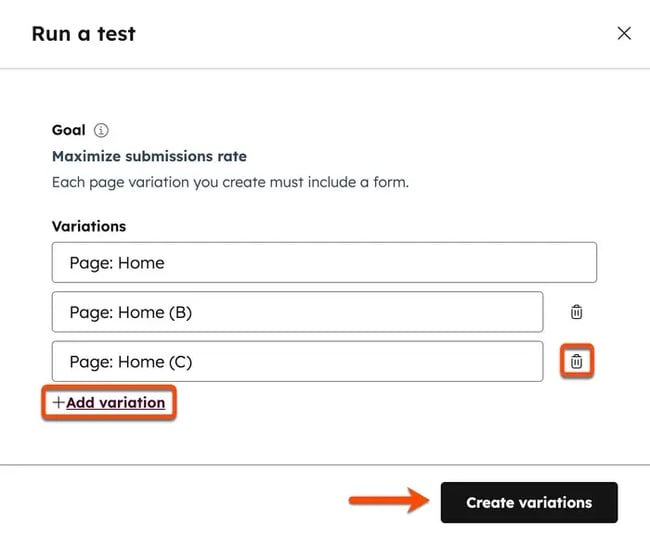
This type of adaptive testing allows marketers to run multiple experiments simultaneously, facilitating up to five variations at a time:
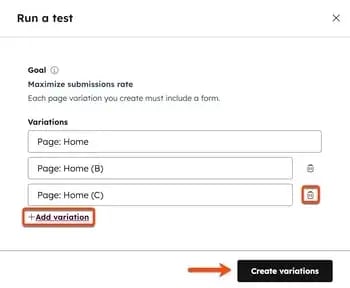
After understanding the different frameworks, work through the following five steps to launch your experiment.
Steps to Design and Run Marketing Experiments
Choose the right question and success metric.
The first step in designing a marketing experiment is articulating the question (hypothesis) being tested and tying it to a specific success metric.
Below are some sample question formulas and applications. Notice that the questions being asked are all clear and data-driven. This is important because unclear hypotheses increase the risk of interpretation bias and false correlations.
|
Question Formulas |
Examples |
|
Will [changing X] increase [Y] [metric] for [audience/marketing asset]? |
Will moving the email opt-in higher increase leads generated by 20% on my most-read blog post? |
|
Will [changing X] decrease [Y] [metric] for [audience/marketing asset]? |
Will removing steps at checkout decrease abandoned carts by 5% for digital products? |
|
Will [changing X] reduce time to [desired action] for [asset]? |
Will adding social proof to our email nurture sequence reduce time to purchase for our software demos? |
Where to start? I recommend you experiment with an underperforming page first. Find an ad, landing page, or website page that has low conversion rates and develop a hypothesis for improvement.
Pick a test type and define the variable.
After choosing the right question for their experiment, marketers must select a testing framework. Selecting the wrong test type or testing too many variables simultaneously can make results difficult to interpret and act on.
While there are many different types of marketing tests to run, let's look at three common test types, the variables that they measure, and common examples.
|
Test Types |
Examples |
Variable |
|
A/B |
Email subject lines, sales page CTAs, button color |
One isolated element, such as copy, placement, or color |
|
Multivariate |
Testing multiple page elements at once, like headings, layout, and images |
Multiple elements tested simultaneously to measure interaction effects |
|
Holdout |
Measuring the real impact of ads, lifecycle emails, or always-on campaigns |
Exposure versus no exposure to a campaign or marketing materials |
Where to start? I recommend an A/B test. It's one of the most effective marketing experiments because it offers instant clarity on a single variable. Use HubSpot’s free A/B testing kit to quickly iterate on experiments.
Estimate the sample and set a stopping rule.
Marketing experiments need a clear endpoint (stopping rule) that signals when the experiment has gathered enough data (sample) to render the hypothesis proven or disproven. The stopping point should be objective and predefined before an experiment begins.
Some common stopping points for marketing experiments are:
|
Potential Stopping Point |
What It Determines |
Example |
|
Traffic/sample size |
If enough data was gathered to confidently compare results between the control group and the experiment |
Experiment ends after 15,000 viewers have experiential marketing materials |
|
Duration |
Experiment time frame |
Experiment ends after 14 days have passed |
|
KPIs met |
If the hypothesis was supported by the success metric |
The hypothesis of a 5% click-through rate improvement was realized |
|
Budget |
How much marketing spend should be invested |
Experiment ends after $1,000 in ad spend is reached |
|
Negative performance |
If the variant is causing extreme harm |
A social media experiment concludes when it results in a 2% lower engagement rate on the entire account |
|
Data quality issue |
Whether results can be trusted |
Errors or attribution issues are detected |
|
External event |
If an external force has impacted experiment results |
A national emergency dominates news cycle and promotional materials on social media are paused |
Build, ensure quality, and launch.
Experiment design and execution greatly impact results. Building an experiment with a focus on quality assurance protects marketing effort and spend from chasing inconclusive or biased experimental results.
Consider the following checks and balances during the build, QA, and launch phase of an experiment:
Build:- Control and variant are implemented correctly.
- Only the intended variable is different.
- Tracking events fire correctly.
- Randomization works as expected.
- Test launches during normal traffic patterns.
- Tracking mechanics (UTM codes, pixels, analytics) are correctly recording data.
I'll share exact tool recommendations for running marketing experiments below.
Analyze, document, and decide the rollout.
Analysis is an essential part of the experimental marketing process. Establishing the success or failure of marketing efforts helps make the data gathered actionable, while also feeding the development of future experiments.
Marketing teams should ask objective, investigative questions to analyze, document, and determine experiment rollout. Here's a checklist:
Analyze:- Did the experiment reach its predefined stopping rule?
- Was enough data collected to evaluate the experiment?
- Did the variant outperform the control on the primary metric?
- Could external factors (seasonality, campaigns, news events) have influenced results?
- What was the original hypothesis, and was it supported by the data?
- What was the exact variable changed?
- What unexpected outcomes or behaviors emerged?
- What assumptions were validated or invalidated?
- Should the winning variant be iterated on or retested?
- Is this outcome strong enough to apply across other channels or assets?
- Does this result justify rolling out to 100% of traffic?
- Are there risks in scaling this change broadly?
Common Pitfalls That Break Marketing Experiments
Marketing experiments can be sabotaged by common pitfalls like seasonal effects, skipping qualitative review, selecting the wrong duration, and running multiple experiments at once. Heed these warnings.
Skipping Qualitative Review
While data is important in objectively evaluating a marketing experiment's success, human review of qualitative factors is essential. Scott Queen, senior product strategist at SegMetrics, advised that marketers must look at marketing experiments from both a quantitative and qualitative perspective.
Using the example of lead generation, Queen shared that “you have to think about it in two ways: the pure number... And then you have to do some analysis of 'are they the right people?'”
A lead generation campaign that resulted in 1,000 new email signups might look successful, but what if none of those customers live within the shipping range of an ecommerce company? Quantitative alone can‘t determine a marketing experiment’s success.
Choosing the Wrong Duration
The duration of marketing experimentation impacts marketing spend and the amount of data gathered. Finding the right duration for a marketing experiment is a balancing act.
How long should brands run a marketing experiment? That depends on the channel.
“Some of your marketing tactics that are reasonably immediate, I would say you look at them weekly,” shared Queen. Other desired outcomes, like growing organic website traffic from an SEO experiment, can take months to gather enough data.
Not Accounting for Seasonal Effects
Tests that are executed during atypical periods (holidays, national emergencies, elections) may be skewed due to external influences rather than the experiment itself.
This shift change comes from both viewers and algorithms. For example, as a Pinterest marketer, I know to avoid publishing evergreen content from Thanksgiving to Christmas because seasonal content is so heavily favored by Pinterest's algorithm. This skew is forced by the algorithm.
During periods of crisis, user attention, or even time spent on social media, can decrease. When possible, avoid running experiments during these periods to reduce the risk of attributing results to factors outside the test.
Running Multiple Experiments at Once
Running multiple tests at once increases the risk of incorrect attribution. Attribution is already challenging in digital marketing, where many touchpoints (such as influencer mentions or AI-generated overviews) are difficult to capture.
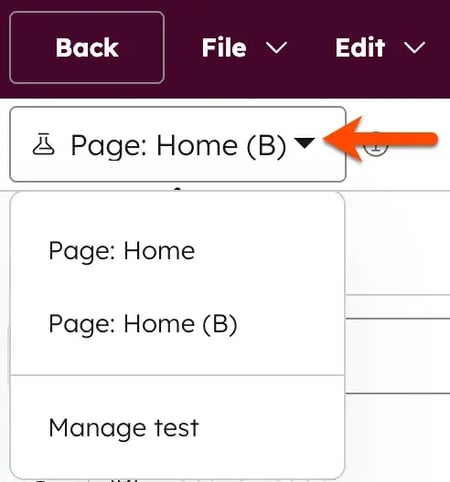
When possible, running experiments sequentially or coordinating parallel tests helps ensure results can be interpreted with confidence. For example, changing a single variable on the homepage and testing these versions parallel to each other:
Tools to Plan, Run, and Analyze Marketing Experiments
Consider the following tools to plan and execute your marketing efforts.
Marketing Hub
HubSpot‘s Marketing Hub is a comprehensive platform that combines data from social media, a business’s website, CRM, search engines, and paid ads into one user-friendly dashboard. Easily filter data by asset titles, type, interaction type, interaction source, and campaigns.
Price: Paid plans start at $10/month
Standout features include:
- Ad retargeting and audience management: Build and test retargeting campaigns across experimental groups.
- Advanced personalization: Create and test personalized content experiences based on CRM data, lifecycle stage, or behavior.
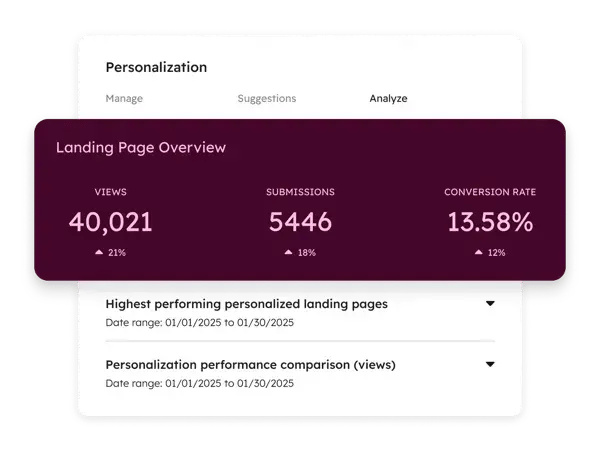
- Smart CRM integration: Run experiments on consistently defined audiences using shared CRM data across teams.
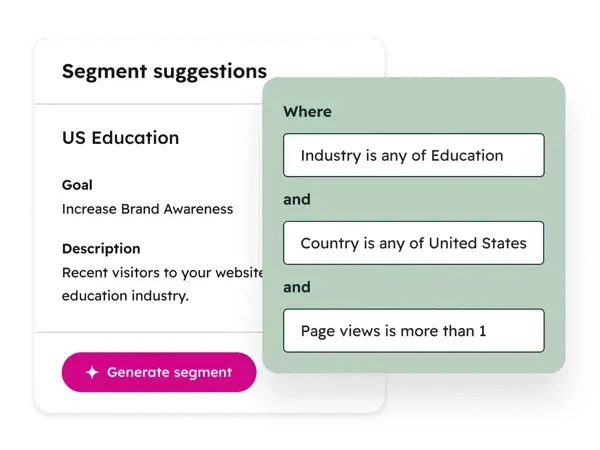
- AI-powered segmentation: Use AI segment suggestions to define and refine audience groups for more relevant experiments.
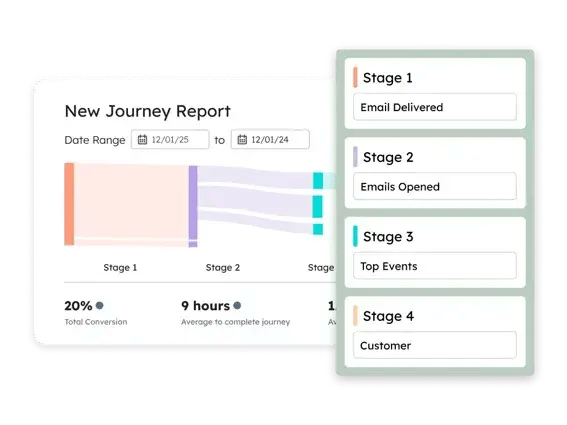
- Journey mapping: Analyze customer journey data to find where visitors are most likely to convert.
- A/B and adaptive testing: Test variations of landing pages, emails, and CTAs to identify what drives higher engagement and conversions.
- Behavioral event tracking: Track and report on specific user actions to measure experiment impact beyond surface-level metrics.
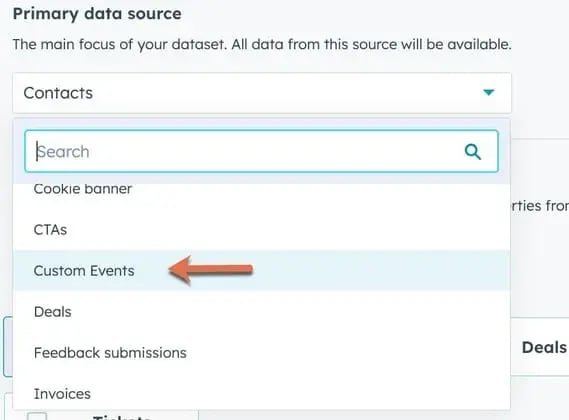
- Advanced marketing reporting: Analyze experiment results across channels and funnel stages in unified dashboards.
- SEO and content performance tracking: Measure how content and SEO experiments affect organic traffic, engagement, and conversions.
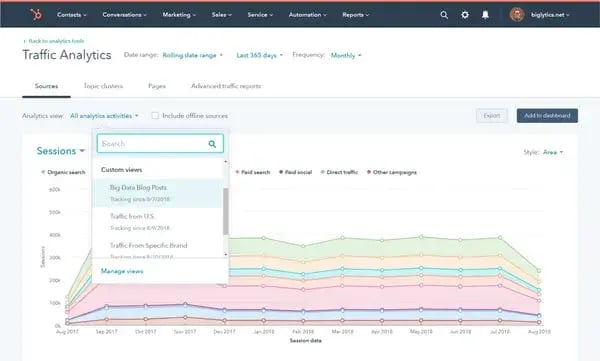
What we like: HubSpot's Marketing Hub makes data as actionable as possible, allowing for easy decision-making and understanding across marketing team members. I like that the built-in AI features work with you instead of taking over entire processes, leaving you firmly in control of your own experiments while still leveraging the insights that AI brings.
SegMetrics
SegMetrics is a marketing attribution and reporting tool designed to help marketers understand how experiments impact revenue. It connects marketing touchpoints across the funnel to downstream outcomes, making it easier to validate whether experiments are driving qualified leads, customers, and lifetime value.
Price: Starts at $57/month
Key features include:
- Revenue-based attribution
- Lifecycle and funnel reporting
- Campaign and channel attribution
- CRM and marketing tool integrations
- Lead quality analysis
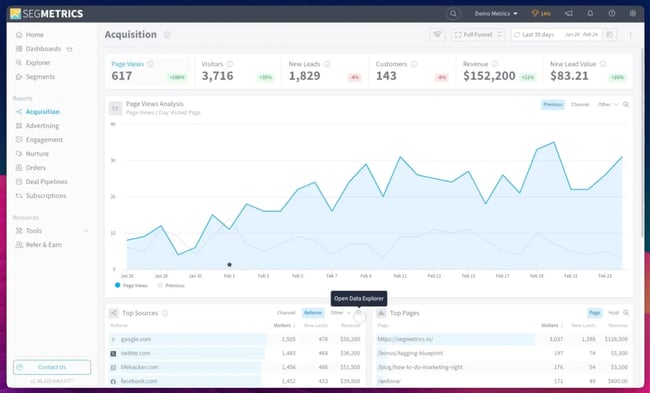
What we like: The subscription model features. Many reporting tools struggle to measure results for companies promoting recurring subscription purchases. On a demo call with Queen, he showed me SegMetrics' pre-built tools to help marketers find which experiments extend customer lifetime value (LTV) for subscription-based businesses.
Google Analytics 4
Google Analytics 4 (GA4) measures countless user interactions and events. It provides a famously (or maybe infamously) overwhelming amount of data, but as it relates to marketing experimentation, GA4 helps marketers with funnel analysis, traffic segmentation, and experiment validation across channels.
Price: Free
Some GA4 features that relate to marketing experimentation include:
- Event-based tracking
- Segment comparisons
- Conversions
- Traffic source and campaign reporting (with UTM parameters, explained below)
This GA4 snapshot illustrates how teams can analyze user volume and engagement trends over time to evaluate whether an experiment meaningfully changes on-site behavior.
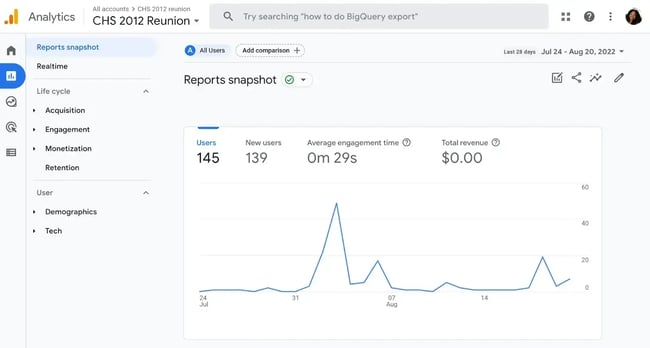
What we like: GA4 is widely adopted, which makes it a familiar and accessible data source for experimentation. It helps teams validate experiment results by tracking user behavior, traffic sources, and conversions without requiring additional setup.
UTM Parameters
UTM codes aren't a software or program, but are an instrumental tool in tracking attribution across platforms and experiments. A UTM (Urchin Tracking Module) code is a small bit of text added to a URL to track the performance of that specific marketing asset.
Price: Free
These codes can contain up to five parameters:
- utm_source
- utm_medium
- utm_campaign
- utm_term (optional, mainly for paid search)
- utm_content (optional, often for A/B testing)
Here's an example from the HubSpot blog:
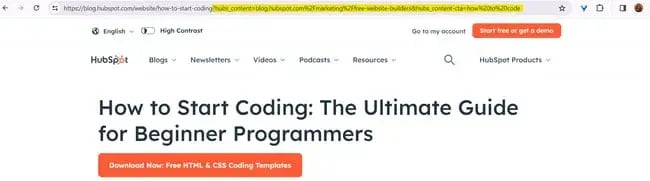
UTM codes don't replace attribution software like HubSpot. Instead, they work together to improve campaign-level attribution and tracking.
You can create a UTM code easily with HubSpot (pictured below, instructions here), as well as Google Analytics Campaign URL Builder.
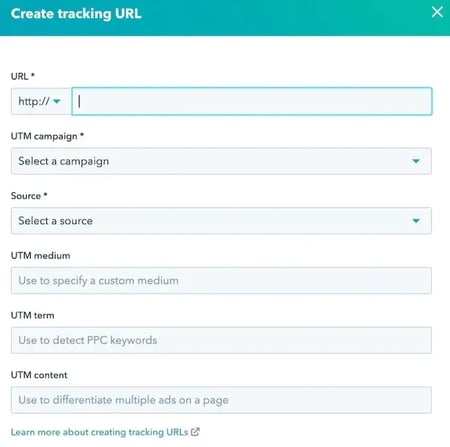
What we like: It's not a standalone tool, but UTM parameters are essential to the experimentation process. I like how quick and easy they are to create.
Real‑World Marketing Experiment Examples
Let's review some real-world marketing experiments: their hypotheses, variants, and outcomes. Experiments in this section cover different areas of the sales funnel and are drawn from real case studies and companies.
Lead Qualification and Automation
Handled worked with HubSpot to centralize and refine its lead qualification process to improve conversions and sales efficiency at the decision stage of the funnel.
- Hypothesis: By replacing manual coordination with automated workflows, Handled could increase lead-to-customer conversion rates and provide a seamless retention experience that manual competitors couldn't match.
- Variant: Handled moved away from fragmented tools to a centralized HubSpot CRM system. They implemented Programmable Automation to instantly sync logistics data and trigger personalized customer communications the moment a lead reached the decision phase.
- Business outcome: The team achieved a “Single Source of Truth,” allowing them to focus on closing deals rather than manual data entry.

Consider applying this real-life example to your marketing in these two ways.
Test lead quality, not just lead volume.
Teams can experiment with form fields, qualification questions, or gated content to validate whether fewer but more qualified leads drive better downstream outcomes. This helps shift experimentation from vanity metrics to revenue impact.
Align messaging with sales conversations.
Another experiment to consider is testing landing pages and ad messaging against real sales objections or FAQs. This validates whether clearer expectation-setting improves conversion quality and reduces friction later in the funnel.
Mini Cart Redesign
Grene and VWO Services (https://vwo.com/success-stories/grene/) ran an A/B test on Grene's mini cart (decision stage of the funnel) that reportedly increased cart page visits, conversions, and purchase quantity.
- Hypothesis: Making the mini cart easier to use (higher CTA, remove friction) would increase purchase quantity.
- Variant: Redesigned mini cart with prominent CTA, simplified UI, and product total visibility.
- Business outcome: The redesign led to a 16.63% increase in conversion rate and doubled the average purchase quantity.
The case study from VWO Services notes that other changes were also made (and goes into detail here), but cites the mini cart redesign as the catalyst.
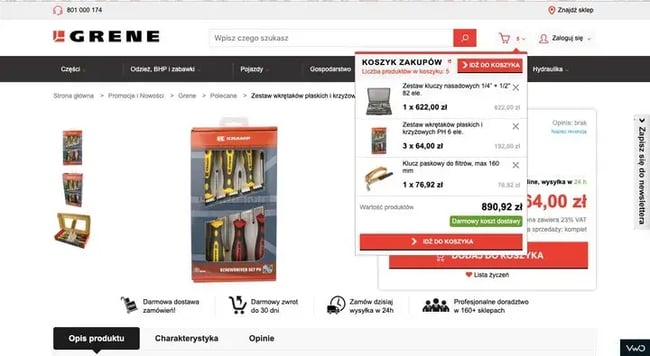
What we like: In the case study summary, VWO Services noted that they removed certain options from the mini cart's design to reduce the odds of customers accidentally removing items from their cart. I really like the UX considerations and the ripple effect of simple experiments.
Remove steps from checkout.
Teams can test removing secondary actions from the cart or checkout flow. This experiment validates whether fewer choices increase completed purchases without hurting average order value.
Increase primary CTA visibility.
Another simple test is increasing the prominence of the primary checkout CTA through size, contrast, or placement. This helps confirm whether having a clearer visual hierarchy reduces hesitation at the moment of purchase.
Landing Page Navigation Removal
HubSpot ran an A/B test removing top navigation from landing pages to see if this improved conversions at the decision stage of the funnel.
- Hypothesis: Removing navigation links/search bar would reduce distractions and increase focus on the primary conversion goal.
- Variant: Landing pages with navigation links removed, directing attention to a single CTA.
- Business outcome: The test revealed that removing navigation was most effective at the decision stage, resulting in a 16% to 28% increase in conversion rates for high-intent pages (like demo requests). Interestingly, the change had a much smaller impact on awareness-stage pages.
Reduce cognitive load at the moment of decision.
Teams can test simplified landing pages to validate whether fewer choices lead to higher completion rates. This is especially effective when the goal is a single action, like form fills or demo requests.
Match navigation depth to intent level.
Another idea is to selectively remove navigation only on decision-stage assets, while keeping it on awareness or educational pages. This helps confirm whether focused experiences perform better once users are ready to convert.
Free Trial CTA Testing
Going and Unbounce ran an A/B test on the homepage CTA to improve conversions at the decision stage of the funnel.
- Hypothesis: Changing the call-to-action from “Sign up for free” to “Trial for free” would better communicate value and increase conversions.
- Variant: Modified CTA text to emphasize a free trial rather than a free plan.
- Business outcome: The variant drove a 104% increase in conversions month-over-month.

What we like: Ah, the power of focused, smart A/B testing. I think this works because the new language made the value of the premium offering clearer, reducing hesitation from the viewer.
Test value framing in CTAs.
Teams can experiment with CTAs that emphasize access over commitment. This helps validate which language better reduces perceived risk at the decision stage.
Align CTA with product model.
Another simple test is matching CTA copy with how the product actually works, like trials or previews. This confirms whether clearer expectation-setting improves conversions by reducing friction and uncertainty.
Social Listening
Rozum Robotics used the social listening tool Awario to strengthen PR and lead generation efforts for Rozum Café.
- Hypothesis: By monitoring real-time web and social mentions, the team could identify niche audiences and influencers more effectively than traditional research methods.
- Tactics: Implemented brand and competitor monitoring to track industry sentiment, surface relevant influencers in food-tech and robotics, and engage with online mentions in real time.
- Outcome: The team identified two new target audiences, reduced PR research time by 70%, and improved lead quality through more targeted outreach.

Audience discovery through social listening.
Teams can replicate this experiment by monitoring brand, competitor, and category keywords to uncover unexpected audiences engaging with related topics. This helps validate whether current targeting assumptions match real-world conversations.
Influencer and media identification experiments.
Instead of relying on static media lists, marketers can test social listening to identify journalists, creators, or niche communities already discussing adjacent products or problems. This validates whether real-time signals lead to higher-quality PR and lead to opportunities.
Marketing Experiment Examples by Funnel Stage
Marketing experiments can target audience members at different points in the customer journey: awareness, consideration, decision, and retention. The 25 experiment ideas below span these four categories to help improve marketing ROI.
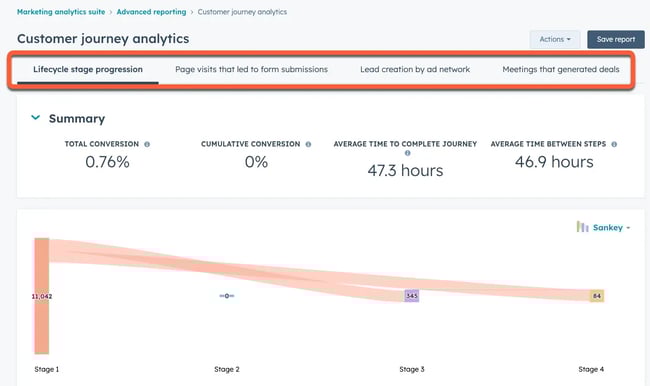
Consider using HubSpot's advanced reporting tools to visually analyze viewers in different lifecycle stages.
Awareness Experiments You Can Launch This Week
Experiments for awareness focus on brand recognition, first contact, and contextualizing the product. Consider these ideas.
- Cold audience targeting test: Compare broad targeting against AI-suggested segments to see which drives lower CPMs or higher engagement. HubSpot’s AI segment suggestions and Smart CRM help define and refine audiences used in the experiment.
- Creative format test (static vs. video): Test whether short-form video ads outperform static images for reach or impressions. Validates which creative format captures attention fastest in cold audiences.
- Pain vs. gain competitor audience test: Test pain-focused versus benefit-focused social ad messaging when targeting users who follow a competitor to evaluate which framing drives stronger engagement from cold audiences.
- Headline framing test (benefit vs. curiosity): Compare benefit-led headlines against curiosity-driven headlines in paid social or display ads. Test which framing gets more engagement from viewers.
- Message framing test: Test brand-led messaging against product-led messaging for first-touch engagement. Results can be analyzed using HubSpot’s campaign and traffic analytics.
Consideration Experiments That Lift Engagement
Experiments for the consideration phase focus on improving engagement, developing a relationship, and making the product's value known. Consider these ideas.
- On-page engagement test: Compare static pages to pages with interactive elements. Behavioral event tracking in HubSpot helps measure scroll depth, clicks, and engagement signals.
- Email nurture sequencing test: Test different nurture paths for the same segment. Compare plain text emails with design-heavy HTML emails for engagement differences.
- Content format test (guide vs. checklist): Offer the same email opt-in as a longer-form ebook versus a short checklist. Validates how much depth audience members want before taking the next step.
- Social proof placement test: Test testimonials above vs. below the fold on landing pages. Measure scroll depth and time spent on page for engagement lift.
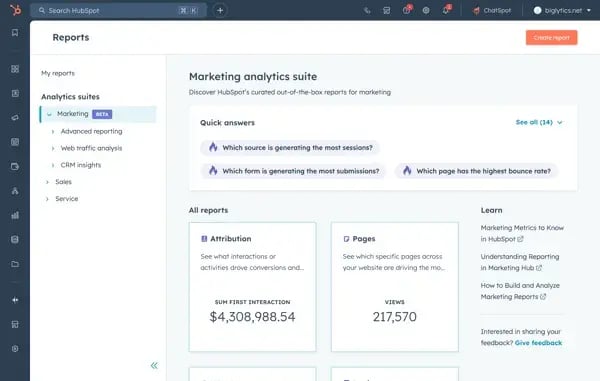
- Lead magnet format test: Test a checklist versus a long-form guide on the same topic. HubSpot reporting (pictured below) shows which asset drives deeper engagement and assisted conversions.
Decision‑Stage Experiments That Drive Conversions
Decision-stage experiments test messaging, pricing, customer information intake, and retargeting to achieve higher conversion rates. Consider these experiment ideas.
- Form length test: Test short vs. qualifying forms to balance conversion rate and lead quality. HubSpot's Smart CRM data helps assess downstream impact beyond the initial conversion.
- CTA intent test: Compare low-commitment CTAs (“Get started”) with high-intent CTAs (“Book a demo”).
- Retargeting message test: Serve different retargeting ads to users who viewed pricing but didn’t convert.
- Urgency messaging test: Test countdowns, limited availability, or deadline language. Validates whether urgency increases conversions without harming trust.
- Pricing page experiment: Test simplified pricing layouts against detailed feature breakdowns. Adaptive testing in HubSpot (pictured below) allows teams to test multiple versions efficiently.
Retention and Expansion Experiments That Improve LTV
Retention and expansion experiments analyze customer onboarding, communication, and feedback with the goal of retaining customers for as long as possible. Consider these ideas:
- Lifecycle email timing test: Test when to introduce upsell or cross-sell messaging. HubSpot Smart CRM lifecycle stages ensure users are evaluated consistently.
- Onboarding flow test: Compare a short onboarding sequence to a guided, multi-step experience.
- Customer feedback timing test: Test immediate surveys versus milestone-based feedback. Reporting helps connect feedback to churn or expansion.
- Personalized retention offers: Test personalized incentives based on usage or purchase history.
- Product usage email cadence: Test sending educational/product benefit emails weekly versus biweekly. Evaluates how frequency impacts open rates and click-throughs without causing fatigue.
Analyze data easily with HubSpot's customer journey reporting:
SEO and Content Experiments for Durable Growth
Experiments that aim to improve long-term organic growth, like SEO and social media content, focus on being displayed in search results, meeting user needs, and personalizing experiences with your brand.
- SERP feature optimization test: Test FAQ or snippet-friendly formatting. HubSpot analytics help monitor organic performance and engagement.
- Landing page A/B test: Test two different landing pages targeting the same keyword or search intent. Validates whether layout, messaging, or CTA structure improves engagement and conversions from organic traffic without changing rankings.
- Social post format test: Test different social post formats—such as text-only, carousel, or short video—when promoting the same content. Validates which format drives higher click-through rates and return visits to owned content.
- Content depth test: Compare concise answers against long-form, comprehensive guides on the same topic. Validates how depth impacts rankings, time on page, and conversion behavior.
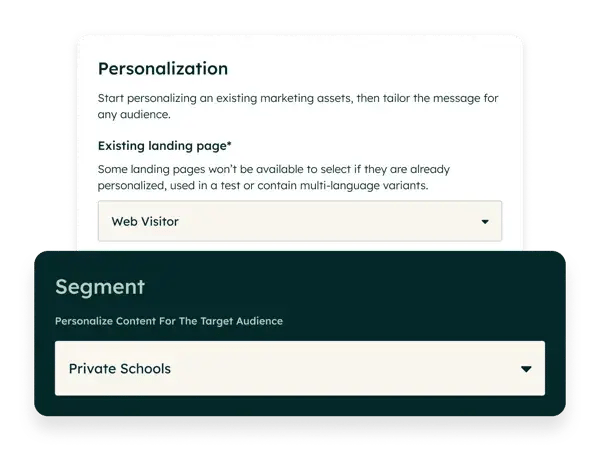
- Personalized landing page experiment: Test personalized landing page content based on visitor segmentation or CRM data against a generic version. This can be done with HubSpot's AI-powered personalization tools (pictured below).
Frequently Asked Questions About Marketing Experiments
How long should a marketing experiment run?
The duration of a marketing experiment is determined by the channel and sample size. Experimental paid advertising campaigns can be reviewed weekly, while efforts like organic SEO and organic social media posts may take weeks or months to collect sufficient data.
Can I test more than one variable at a time?
Testing more than one variable at a time, known as multivariate testing, isn’t recommended for beginners, as the results are often less conclusive than those from tests like A/B testing. However, these tests can be effective for gauging interaction effects.
What if my marketing experiment is inconclusive?
An inconclusive (or “null”) result is still a win: it proves that the specific change you tested does not significantly influence your audience‘s behavior. In this case, marketers shouldn’t just try again: they should develop a bolder hypothesis.
When should I stop a marketing experiment early?
Marketing experiments should be stopped early if there are errors with attribution or analytics, if they result in an extremely negative outcome, or if external factors (such as national crises, elections, or holidays) interfere with results. Avoid stopping tests just because they look “down” in the first few days, as data often stabilizes over time.
Do I need statistical software to analyze results?
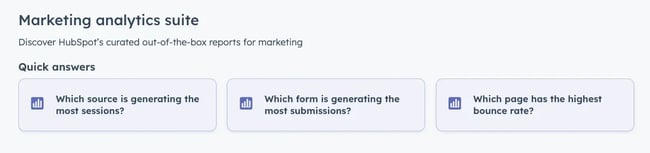
Marketing teams can conduct experiments without statistical software, but data must still be collected reliably for accurate reporting. Good reporting software not only collects data but also makes it actionable. For example, HubSpot has advanced marketing reports inside the marketing analytics suite that provide quick answers, like “which form is generating the most submissions?”
Next Steps
Experimentation is in the DNA of modern marketing. It helps brands uncover more effective marketing messages, promotions, and strategies for converting viewers into customers. Leveraged correctly, a brand's experiments directly lead to business growth.
With built-in experimentation, personalization, and reporting capabilities, HubSpot makes it easier for teams to turn experiments into insights and insights into growth.

from Marketing https://blog.hubspot.com/marketing/marketing-experimentation
Every reliable tactic marketers now love, from video content to email marketing and blogging, was once a new experiment that early adopters tested and developed. Creating new marketing strategies is foundational to marketing, helping brands reach new customers and gather data that helps facilitate smarter business decisions.
While experimentation isn‘t new, digital marketing offers brands greater flexibility and potential. Let’s look at experiment types, which metrics to track, and how to design experiments across marketing channels to achieve maximum success.
Table of Contents
- What are marketing experiments, and how do they work?
- The Elements Every Marketing Experiment Needs
- A/B vs. Multivariate Marketing Experiments
- Steps to Design and Run Marketing Experiments
- Common Pitfalls That Break Marketing Experiments
- Tools to Plan, Run, and Analyze Marketing Experiments
- Real‑World Marketing Experiment Examples
- Marketing Experiment Examples by Funnel Stage
- Frequently Asked Questions About Marketing Experiments
What are marketing experiments, and how do they work?
Marketing experiments are controlled changes to a marketing message or campaign to improve reach or conversion rates. These tests can be a small, single tweak or a campaign-wide experiment. Successful marketing experiments assess both quantitative data and qualitative factors, and the campaign results directly feed the next iteration of marketing materials.
Experiments are a part of step four in the Loop Marketing cycle: evolve in real-time. Here are quick examples of marketing experiments feeding the loop:
|
Experiment Example |
How it Feeds the Marketing Loop |
|
Change CTA button color on a landing page |
Measures immediate impact on click-through rate (CTR); then, iterates the winning version to improve conversion rates |
|
Test UGC vs. branded photography in paid ads |
Uses engagement and conversion data to evolve ad strategy based on what resonates with audiences |
|
A/B test email subject lines |
Evaluates open rates, engagement rates, and qualitative replies to refine future messaging |
The Elements Every Marketing Experiment Needs
Before spending any marketing budget on an experiment, make sure it has what it needs to succeed: a solid foundation, clear test factors, predetermined success metrics, and an intentionally selected framework.
The Basics
Marketing experiments are composed of a few key factors, like a specific hypothesis, subject, and both dependent and independent variables.
- Measurable hypothesis (expected outcome): A clear, testable prediction.
- Subjects: Who is exposed to the experiment.
- Independent variable: The element marketers intentionally change.
- Dependent variable: The measured outcome.
Here‘s an example of how this looks: A local coffee shop runs a Facebook advertising campaign targeting people who have liked its page (subjects). The owners hypothesize that offering a 10% off rainy-day promotion (independent variable) will increase Facebook ad conversion rates by 20% (dependent variable), compared to evergreen ads that don’t change with the weather.
Test Factors
Marketing experimentation requires several test factors, like control vs. variant, randomization, and experiment duration.
- Control: The original version of a message, ad, or experience (baseline).
- Variant: The version that includes the intentional change being tested (like new copy, creative materials, or promotions).
- Randomization: The process of randomly assigning people to see either the control or the variant.
- Duration: The length of time the experiment runs, determined by how much data is needed to confidently compare results.
Success Metrics
Measuring the success of a marketing experiment is more nuanced than relying on a single metric. Both primary and secondary metrics must be considered:
- Primary metric: The single desired outcome (like lead generation or sales)
- Secondary metrics: Supporting outcomes that provide additional context (like engagement or time on page)
Note that the data alone doesn‘t tell a complete story of an experiment’s success (I’ll share more on this below).
A/B vs. Multivariate Marketing Experiments
Marketing experiments follow three common frameworks: A/B tests, multivariate tests, and holdout tests. Each evaluates different elements of a marketing campaign and shares its own valuable insights.
|
What It Does |
How It Feeds The Marketing Loop |
|
|
A/B Tests |
Compares one specific change to the control group |
Insights are easy to interpret and can be applied immediately to improve future iterations |
|
Multivariate Changes |
Compares multiple variables simultaneously |
Results are more difficult to interpret, but can provide insights that help marketing materials evolve holistically |
|
Holdout Tests |
Compares viewers exposed to a campaign with those intentionally not exposed to measure incremental impact |
Identifies whether marketing exposure drives an outcome that would not have occurred otherwise |
Both A/B testing and multivariate testing are built into marketing software like the HubSpot Marketing Hub. Users can quickly test variations of content and see how they perform:
This type of adaptive testing allows marketers to run multiple experiments simultaneously, facilitating up to five variations at a time:
After understanding the different frameworks, work through the following five steps to launch your experiment.
Steps to Design and Run Marketing Experiments
Choose the right question and success metric.
The first step in designing a marketing experiment is articulating the question (hypothesis) being tested and tying it to a specific success metric.
Below are some sample question formulas and applications. Notice that the questions being asked are all clear and data-driven. This is important because unclear hypotheses increase the risk of interpretation bias and false correlations.
|
Question Formulas |
Examples |
|
Will [changing X] increase [Y] [metric] for [audience/marketing asset]? |
Will moving the email opt-in higher increase leads generated by 20% on my most-read blog post? |
|
Will [changing X] decrease [Y] [metric] for [audience/marketing asset]? |
Will removing steps at checkout decrease abandoned carts by 5% for digital products? |
|
Will [changing X] reduce time to [desired action] for [asset]? |
Will adding social proof to our email nurture sequence reduce time to purchase for our software demos? |
Where to start? I recommend you experiment with an underperforming page first. Find an ad, landing page, or website page that has low conversion rates and develop a hypothesis for improvement.
Pick a test type and define the variable.
After choosing the right question for their experiment, marketers must select a testing framework. Selecting the wrong test type or testing too many variables simultaneously can make results difficult to interpret and act on.
While there are many different types of marketing tests to run, let's look at three common test types, the variables that they measure, and common examples.
|
Test Types |
Examples |
Variable |
|
A/B |
Email subject lines, sales page CTAs, button color |
One isolated element, such as copy, placement, or color |
|
Multivariate |
Testing multiple page elements at once, like headings, layout, and images |
Multiple elements tested simultaneously to measure interaction effects |
|
Holdout |
Measuring the real impact of ads, lifecycle emails, or always-on campaigns |
Exposure versus no exposure to a campaign or marketing materials |
Where to start? I recommend an A/B test. It's one of the most effective marketing experiments because it offers instant clarity on a single variable. Use HubSpot’s free A/B testing kit to quickly iterate on experiments.
Estimate the sample and set a stopping rule.
Marketing experiments need a clear endpoint (stopping rule) that signals when the experiment has gathered enough data (sample) to render the hypothesis proven or disproven. The stopping point should be objective and predefined before an experiment begins.
Some common stopping points for marketing experiments are:
|
Potential Stopping Point |
What It Determines |
Example |
|
Traffic/sample size |
If enough data was gathered to confidently compare results between the control group and the experiment |
Experiment ends after 15,000 viewers have experiential marketing materials |
|
Duration |
Experiment time frame |
Experiment ends after 14 days have passed |
|
KPIs met |
If the hypothesis was supported by the success metric |
The hypothesis of a 5% click-through rate improvement was realized |
|
Budget |
How much marketing spend should be invested |
Experiment ends after $1,000 in ad spend is reached |
|
Negative performance |
If the variant is causing extreme harm |
A social media experiment concludes when it results in a 2% lower engagement rate on the entire account |
|
Data quality issue |
Whether results can be trusted |
Errors or attribution issues are detected |
|
External event |
If an external force has impacted experiment results |
A national emergency dominates news cycle and promotional materials on social media are paused |
Build, ensure quality, and launch.
Experiment design and execution greatly impact results. Building an experiment with a focus on quality assurance protects marketing effort and spend from chasing inconclusive or biased experimental results.
Consider the following checks and balances during the build, QA, and launch phase of an experiment:
Build:- Control and variant are implemented correctly.
- Only the intended variable is different.
- Tracking events fire correctly.
- Randomization works as expected.
- Test launches during normal traffic patterns.
- Tracking mechanics (UTM codes, pixels, analytics) are correctly recording data.
I'll share exact tool recommendations for running marketing experiments below.
Analyze, document, and decide the rollout.
Analysis is an essential part of the experimental marketing process. Establishing the success or failure of marketing efforts helps make the data gathered actionable, while also feeding the development of future experiments.
Marketing teams should ask objective, investigative questions to analyze, document, and determine experiment rollout. Here's a checklist:
Analyze:- Did the experiment reach its predefined stopping rule?
- Was enough data collected to evaluate the experiment?
- Did the variant outperform the control on the primary metric?
- Could external factors (seasonality, campaigns, news events) have influenced results?
- What was the original hypothesis, and was it supported by the data?
- What was the exact variable changed?
- What unexpected outcomes or behaviors emerged?
- What assumptions were validated or invalidated?
- Should the winning variant be iterated on or retested?
- Is this outcome strong enough to apply across other channels or assets?
- Does this result justify rolling out to 100% of traffic?
- Are there risks in scaling this change broadly?
Common Pitfalls That Break Marketing Experiments
Marketing experiments can be sabotaged by common pitfalls like seasonal effects, skipping qualitative review, selecting the wrong duration, and running multiple experiments at once. Heed these warnings.
Skipping Qualitative Review
While data is important in objectively evaluating a marketing experiment's success, human review of qualitative factors is essential. Scott Queen, senior product strategist at SegMetrics, advised that marketers must look at marketing experiments from both a quantitative and qualitative perspective.
Using the example of lead generation, Queen shared that “you have to think about it in two ways: the pure number... And then you have to do some analysis of 'are they the right people?'”
A lead generation campaign that resulted in 1,000 new email signups might look successful, but what if none of those customers live within the shipping range of an ecommerce company? Quantitative alone can‘t determine a marketing experiment’s success.
Choosing the Wrong Duration
The duration of marketing experimentation impacts marketing spend and the amount of data gathered. Finding the right duration for a marketing experiment is a balancing act.
How long should brands run a marketing experiment? That depends on the channel.
“Some of your marketing tactics that are reasonably immediate, I would say you look at them weekly,” shared Queen. Other desired outcomes, like growing organic website traffic from an SEO experiment, can take months to gather enough data.
Not Accounting for Seasonal Effects
Tests that are executed during atypical periods (holidays, national emergencies, elections) may be skewed due to external influences rather than the experiment itself.
This shift change comes from both viewers and algorithms. For example, as a Pinterest marketer, I know to avoid publishing evergreen content from Thanksgiving to Christmas because seasonal content is so heavily favored by Pinterest's algorithm. This skew is forced by the algorithm.
During periods of crisis, user attention, or even time spent on social media, can decrease. When possible, avoid running experiments during these periods to reduce the risk of attributing results to factors outside the test.
Running Multiple Experiments at Once
Running multiple tests at once increases the risk of incorrect attribution. Attribution is already challenging in digital marketing, where many touchpoints (such as influencer mentions or AI-generated overviews) are difficult to capture.
When possible, running experiments sequentially or coordinating parallel tests helps ensure results can be interpreted with confidence. For example, changing a single variable on the homepage and testing these versions parallel to each other:
Tools to Plan, Run, and Analyze Marketing Experiments
Consider the following tools to plan and execute your marketing efforts.
Marketing Hub
HubSpot‘s Marketing Hub is a comprehensive platform that combines data from social media, a business’s website, CRM, search engines, and paid ads into one user-friendly dashboard. Easily filter data by asset titles, type, interaction type, interaction source, and campaigns.
Price: Paid plans start at $10/month
Standout features include:
- Ad retargeting and audience management: Build and test retargeting campaigns across experimental groups.
- Advanced personalization: Create and test personalized content experiences based on CRM data, lifecycle stage, or behavior.
- Smart CRM integration: Run experiments on consistently defined audiences using shared CRM data across teams.
- AI-powered segmentation: Use AI segment suggestions to define and refine audience groups for more relevant experiments.
- Journey mapping: Analyze customer journey data to find where visitors are most likely to convert.
- A/B and adaptive testing: Test variations of landing pages, emails, and CTAs to identify what drives higher engagement and conversions.
- Behavioral event tracking: Track and report on specific user actions to measure experiment impact beyond surface-level metrics.
- Advanced marketing reporting: Analyze experiment results across channels and funnel stages in unified dashboards.
- SEO and content performance tracking: Measure how content and SEO experiments affect organic traffic, engagement, and conversions.
What we like: HubSpot's Marketing Hub makes data as actionable as possible, allowing for easy decision-making and understanding across marketing team members. I like that the built-in AI features work with you instead of taking over entire processes, leaving you firmly in control of your own experiments while still leveraging the insights that AI brings.
SegMetrics
SegMetrics is a marketing attribution and reporting tool designed to help marketers understand how experiments impact revenue. It connects marketing touchpoints across the funnel to downstream outcomes, making it easier to validate whether experiments are driving qualified leads, customers, and lifetime value.
Price: Starts at $57/month
Key features include:
- Revenue-based attribution
- Lifecycle and funnel reporting
- Campaign and channel attribution
- CRM and marketing tool integrations
- Lead quality analysis
What we like: The subscription model features. Many reporting tools struggle to measure results for companies promoting recurring subscription purchases. On a demo call with Queen, he showed me SegMetrics' pre-built tools to help marketers find which experiments extend customer lifetime value (LTV) for subscription-based businesses.
Google Analytics 4
Google Analytics 4 (GA4) measures countless user interactions and events. It provides a famously (or maybe infamously) overwhelming amount of data, but as it relates to marketing experimentation, GA4 helps marketers with funnel analysis, traffic segmentation, and experiment validation across channels.
Price: Free
Some GA4 features that relate to marketing experimentation include:
- Event-based tracking
- Segment comparisons
- Conversions
- Traffic source and campaign reporting (with UTM parameters, explained below)
This GA4 snapshot illustrates how teams can analyze user volume and engagement trends over time to evaluate whether an experiment meaningfully changes on-site behavior.
What we like: GA4 is widely adopted, which makes it a familiar and accessible data source for experimentation. It helps teams validate experiment results by tracking user behavior, traffic sources, and conversions without requiring additional setup.
UTM Parameters
UTM codes aren't a software or program, but are an instrumental tool in tracking attribution across platforms and experiments. A UTM (Urchin Tracking Module) code is a small bit of text added to a URL to track the performance of that specific marketing asset.
Price: Free
These codes can contain up to five parameters:
- utm_source
- utm_medium
- utm_campaign
- utm_term (optional, mainly for paid search)
- utm_content (optional, often for A/B testing)
Here's an example from the HubSpot blog:
UTM codes don't replace attribution software like HubSpot. Instead, they work together to improve campaign-level attribution and tracking.
You can create a UTM code easily with HubSpot (pictured below, instructions here), as well as Google Analytics Campaign URL Builder.
What we like: It's not a standalone tool, but UTM parameters are essential to the experimentation process. I like how quick and easy they are to create.
Real‑World Marketing Experiment Examples
Let's review some real-world marketing experiments: their hypotheses, variants, and outcomes. Experiments in this section cover different areas of the sales funnel and are drawn from real case studies and companies.
Lead Qualification and Automation
Handled worked with HubSpot to centralize and refine its lead qualification process to improve conversions and sales efficiency at the decision stage of the funnel.
- Hypothesis: By replacing manual coordination with automated workflows, Handled could increase lead-to-customer conversion rates and provide a seamless retention experience that manual competitors couldn't match.
- Variant: Handled moved away from fragmented tools to a centralized HubSpot CRM system. They implemented Programmable Automation to instantly sync logistics data and trigger personalized customer communications the moment a lead reached the decision phase.
- Business outcome: The team achieved a “Single Source of Truth,” allowing them to focus on closing deals rather than manual data entry.
Consider applying this real-life example to your marketing in these two ways.
Test lead quality, not just lead volume.
Teams can experiment with form fields, qualification questions, or gated content to validate whether fewer but more qualified leads drive better downstream outcomes. This helps shift experimentation from vanity metrics to revenue impact.
Align messaging with sales conversations.
Another experiment to consider is testing landing pages and ad messaging against real sales objections or FAQs. This validates whether clearer expectation-setting improves conversion quality and reduces friction later in the funnel.
Mini Cart Redesign
Grene and VWO Services (https://vwo.com/success-stories/grene/) ran an A/B test on Grene's mini cart (decision stage of the funnel) that reportedly increased cart page visits, conversions, and purchase quantity.
- Hypothesis: Making the mini cart easier to use (higher CTA, remove friction) would increase purchase quantity.
- Variant: Redesigned mini cart with prominent CTA, simplified UI, and product total visibility.
- Business outcome: The redesign led to a 16.63% increase in conversion rate and doubled the average purchase quantity.
The case study from VWO Services notes that other changes were also made (and goes into detail here), but cites the mini cart redesign as the catalyst.
What we like: In the case study summary, VWO Services noted that they removed certain options from the mini cart's design to reduce the odds of customers accidentally removing items from their cart. I really like the UX considerations and the ripple effect of simple experiments.
Remove steps from checkout.
Teams can test removing secondary actions from the cart or checkout flow. This experiment validates whether fewer choices increase completed purchases without hurting average order value.
Increase primary CTA visibility.
Another simple test is increasing the prominence of the primary checkout CTA through size, contrast, or placement. This helps confirm whether having a clearer visual hierarchy reduces hesitation at the moment of purchase.
Landing Page Navigation Removal
HubSpot ran an A/B test removing top navigation from landing pages to see if this improved conversions at the decision stage of the funnel.
- Hypothesis: Removing navigation links/search bar would reduce distractions and increase focus on the primary conversion goal.
- Variant: Landing pages with navigation links removed, directing attention to a single CTA.
- Business outcome: The test revealed that removing navigation was most effective at the decision stage, resulting in a 16% to 28% increase in conversion rates for high-intent pages (like demo requests). Interestingly, the change had a much smaller impact on awareness-stage pages.
Reduce cognitive load at the moment of decision.
Teams can test simplified landing pages to validate whether fewer choices lead to higher completion rates. This is especially effective when the goal is a single action, like form fills or demo requests.
Match navigation depth to intent level.
Another idea is to selectively remove navigation only on decision-stage assets, while keeping it on awareness or educational pages. This helps confirm whether focused experiences perform better once users are ready to convert.
Free Trial CTA Testing
Going and Unbounce ran an A/B test on the homepage CTA to improve conversions at the decision stage of the funnel.
- Hypothesis: Changing the call-to-action from “Sign up for free” to “Trial for free” would better communicate value and increase conversions.
- Variant: Modified CTA text to emphasize a free trial rather than a free plan.
- Business outcome: The variant drove a 104% increase in conversions month-over-month.
What we like: Ah, the power of focused, smart A/B testing. I think this works because the new language made the value of the premium offering clearer, reducing hesitation from the viewer.
Test value framing in CTAs.
Teams can experiment with CTAs that emphasize access over commitment. This helps validate which language better reduces perceived risk at the decision stage.
Align CTA with product model.
Another simple test is matching CTA copy with how the product actually works, like trials or previews. This confirms whether clearer expectation-setting improves conversions by reducing friction and uncertainty.
Social Listening
Rozum Robotics used the social listening tool Awario to strengthen PR and lead generation efforts for Rozum Café.
- Hypothesis: By monitoring real-time web and social mentions, the team could identify niche audiences and influencers more effectively than traditional research methods.
- Tactics: Implemented brand and competitor monitoring to track industry sentiment, surface relevant influencers in food-tech and robotics, and engage with online mentions in real time.
- Outcome: The team identified two new target audiences, reduced PR research time by 70%, and improved lead quality through more targeted outreach.
Audience discovery through social listening.
Teams can replicate this experiment by monitoring brand, competitor, and category keywords to uncover unexpected audiences engaging with related topics. This helps validate whether current targeting assumptions match real-world conversations.
Influencer and media identification experiments.
Instead of relying on static media lists, marketers can test social listening to identify journalists, creators, or niche communities already discussing adjacent products or problems. This validates whether real-time signals lead to higher-quality PR and lead to opportunities.
Marketing Experiment Examples by Funnel Stage
Marketing experiments can target audience members at different points in the customer journey: awareness, consideration, decision, and retention. The 25 experiment ideas below span these four categories to help improve marketing ROI.
Consider using HubSpot's advanced reporting tools to visually analyze viewers in different lifecycle stages.
Awareness Experiments You Can Launch This Week
Experiments for awareness focus on brand recognition, first contact, and contextualizing the product. Consider these ideas.
- Cold audience targeting test: Compare broad targeting against AI-suggested segments to see which drives lower CPMs or higher engagement. HubSpot’s AI segment suggestions and Smart CRM help define and refine audiences used in the experiment.
- Creative format test (static vs. video): Test whether short-form video ads outperform static images for reach or impressions. Validates which creative format captures attention fastest in cold audiences.
- Pain vs. gain competitor audience test: Test pain-focused versus benefit-focused social ad messaging when targeting users who follow a competitor to evaluate which framing drives stronger engagement from cold audiences.
- Headline framing test (benefit vs. curiosity): Compare benefit-led headlines against curiosity-driven headlines in paid social or display ads. Test which framing gets more engagement from viewers.
- Message framing test: Test brand-led messaging against product-led messaging for first-touch engagement. Results can be analyzed using HubSpot’s campaign and traffic analytics.
Consideration Experiments That Lift Engagement
Experiments for the consideration phase focus on improving engagement, developing a relationship, and making the product's value known. Consider these ideas.
- On-page engagement test: Compare static pages to pages with interactive elements. Behavioral event tracking in HubSpot helps measure scroll depth, clicks, and engagement signals.
- Email nurture sequencing test: Test different nurture paths for the same segment. Compare plain text emails with design-heavy HTML emails for engagement differences.
- Content format test (guide vs. checklist): Offer the same email opt-in as a longer-form ebook versus a short checklist. Validates how much depth audience members want before taking the next step.
- Social proof placement test: Test testimonials above vs. below the fold on landing pages. Measure scroll depth and time spent on page for engagement lift.
- Lead magnet format test: Test a checklist versus a long-form guide on the same topic. HubSpot reporting (pictured below) shows which asset drives deeper engagement and assisted conversions.
Decision‑Stage Experiments That Drive Conversions
Decision-stage experiments test messaging, pricing, customer information intake, and retargeting to achieve higher conversion rates. Consider these experiment ideas.
- Form length test: Test short vs. qualifying forms to balance conversion rate and lead quality. HubSpot's Smart CRM data helps assess downstream impact beyond the initial conversion.
- CTA intent test: Compare low-commitment CTAs (“Get started”) with high-intent CTAs (“Book a demo”).
- Retargeting message test: Serve different retargeting ads to users who viewed pricing but didn’t convert.
- Urgency messaging test: Test countdowns, limited availability, or deadline language. Validates whether urgency increases conversions without harming trust.
- Pricing page experiment: Test simplified pricing layouts against detailed feature breakdowns. Adaptive testing in HubSpot (pictured below) allows teams to test multiple versions efficiently.
Retention and Expansion Experiments That Improve LTV
Retention and expansion experiments analyze customer onboarding, communication, and feedback with the goal of retaining customers for as long as possible. Consider these ideas:
- Lifecycle email timing test: Test when to introduce upsell or cross-sell messaging. HubSpot Smart CRM lifecycle stages ensure users are evaluated consistently.
- Onboarding flow test: Compare a short onboarding sequence to a guided, multi-step experience.
- Customer feedback timing test: Test immediate surveys versus milestone-based feedback. Reporting helps connect feedback to churn or expansion.
- Personalized retention offers: Test personalized incentives based on usage or purchase history.
- Product usage email cadence: Test sending educational/product benefit emails weekly versus biweekly. Evaluates how frequency impacts open rates and click-throughs without causing fatigue.
Analyze data easily with HubSpot's customer journey reporting:
SEO and Content Experiments for Durable Growth
Experiments that aim to improve long-term organic growth, like SEO and social media content, focus on being displayed in search results, meeting user needs, and personalizing experiences with your brand.
- SERP feature optimization test: Test FAQ or snippet-friendly formatting. HubSpot analytics help monitor organic performance and engagement.
- Landing page A/B test: Test two different landing pages targeting the same keyword or search intent. Validates whether layout, messaging, or CTA structure improves engagement and conversions from organic traffic without changing rankings.
- Social post format test: Test different social post formats—such as text-only, carousel, or short video—when promoting the same content. Validates which format drives higher click-through rates and return visits to owned content.
- Content depth test: Compare concise answers against long-form, comprehensive guides on the same topic. Validates how depth impacts rankings, time on page, and conversion behavior.
- Personalized landing page experiment: Test personalized landing page content based on visitor segmentation or CRM data against a generic version. This can be done with HubSpot's AI-powered personalization tools (pictured below).
Frequently Asked Questions About Marketing Experiments
How long should a marketing experiment run?
The duration of a marketing experiment is determined by the channel and sample size. Experimental paid advertising campaigns can be reviewed weekly, while efforts like organic SEO and organic social media posts may take weeks or months to collect sufficient data.
Can I test more than one variable at a time?
Testing more than one variable at a time, known as multivariate testing, isn’t recommended for beginners, as the results are often less conclusive than those from tests like A/B testing. However, these tests can be effective for gauging interaction effects.
What if my marketing experiment is inconclusive?
An inconclusive (or “null”) result is still a win: it proves that the specific change you tested does not significantly influence your audience‘s behavior. In this case, marketers shouldn’t just try again: they should develop a bolder hypothesis.
When should I stop a marketing experiment early?
Marketing experiments should be stopped early if there are errors with attribution or analytics, if they result in an extremely negative outcome, or if external factors (such as national crises, elections, or holidays) interfere with results. Avoid stopping tests just because they look “down” in the first few days, as data often stabilizes over time.
Do I need statistical software to analyze results?
Marketing teams can conduct experiments without statistical software, but data must still be collected reliably for accurate reporting. Good reporting software not only collects data but also makes it actionable. For example, HubSpot has advanced marketing reports inside the marketing analytics suite that provide quick answers, like “which form is generating the most submissions?”
Next Steps
Experimentation is in the DNA of modern marketing. It helps brands uncover more effective marketing messages, promotions, and strategies for converting viewers into customers. Leveraged correctly, a brand's experiments directly lead to business growth.
With built-in experimentation, personalization, and reporting capabilities, HubSpot makes it easier for teams to turn experiments into insights and insights into growth.
via Perfecte news Non connection
